
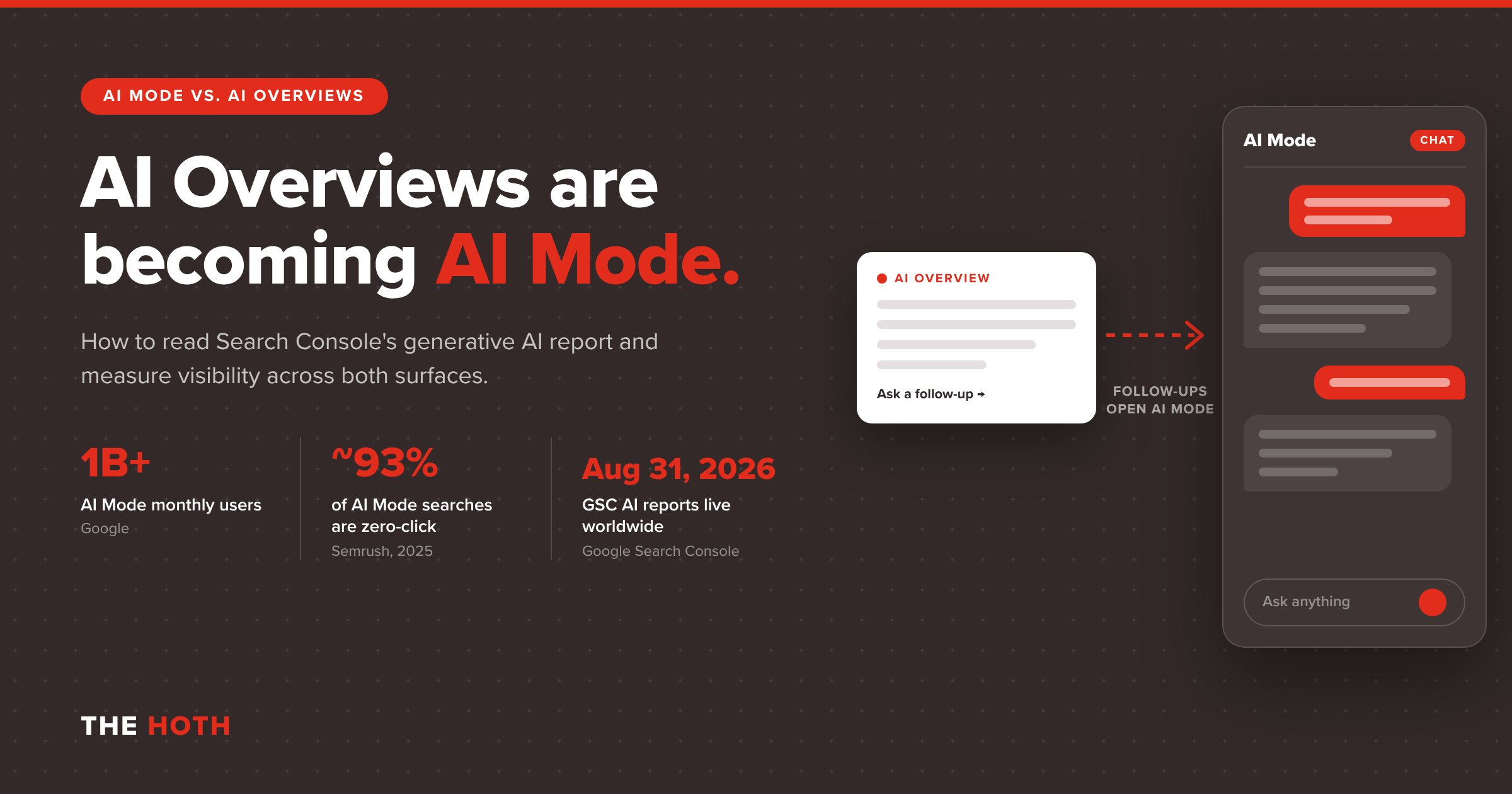

AI Overviews are the AI summaries at the top of a regular Google results page. AI Mode is Google’s full conversational search experience. In 2026, Google started routing AI Overview follow-ups into AI Mode and expanding some Overviews by default, so the two now behave like one journey. Search Console reports their impressions together, without clicks.
You open Search Console, find the new generative AI report, and the line is going up. Your pages are showing up in AI answers more than ever. Then you check clicks and nothing moved. Maybe they dropped.
That disconnect is the story of search in 2026. Google has spent the year blurring the line between AI Overviews and AI Mode, and it finally gave site owners a report for AI visibility. But the report counts impressions, not visits, and it doesn’t split the two surfaces apart.
If you’re trying to explain AI search performance to a boss, a client, or yourself, you need a new way to read the numbers. In this guide, you’ll learn what’s different between AI Mode and AI Overviews, what Google changed this year, what the Search Console report shows (and what it leaves out), and how to reset your traffic expectations without panicking.
This is a measurement post, not a doom post. Let’s get into it.
What’s the Difference Between AI Mode and AI Overviews?
AI Overviews are short AI summaries that appear above classic results only when Google decides they add value. AI Mode is a separate, chat-style search experience built for longer, multi-step questions, with follow-ups and more links. Both use query fan-out, which runs several related searches behind the scenes to build one answer.
Here’s how Google’s own documentation on AI features frames the split. AI Overviews give people a quick snapshot of a topic and a jumping-off point to explore links. AI Mode is meant for questions that need more reasoning, exploration, or comparison, and it returns a longer response with links to supporting sites.
Under the hood, both features can use a technique Google calls query fan-out. Instead of running your exact query once, the system fires off multiple related searches across subtopics and then stitches the results together. That’s why AI answers often cite pages that don’t rank in the top ten for the original keyword.
Google also notes that the two features may use different models. So the same question can produce a different answer, and a different set of cited sources, depending on which surface the searcher lands in.
The quick comparison
- Where it lives: AI Overviews sit inside the normal results page. AI Mode is its own tab and conversation.
- When it shows up: AI Overviews trigger only on some queries. AI Mode responds to whatever the user types into it.
- How people use it: Overviews are a skim. AI Mode is a session with follow-up questions.
- What it means for you: Overviews still sit above organic links you can win. AI Mode pushes classic results out of the picture almost entirely.
If you want the older version of this comparison, our breakdown of AI Overviews vs. featured snippets covers how Overviews replaced the old answer box. And our look at how Google’s AI Overviews reshaped search results explains the first wave of click loss. This post picks up where those leave off: the merge, and how to measure it.
What Changed in 2026 When Google Started Merging the Two?
Google made AI Overviews a doorway into AI Mode. In January 2026, follow-up questions asked from an AI Overview began opening AI Mode conversations. By late August, Google confirmed that some AI Overviews now expand by default with an open follow-up box, pushing organic results lower on the page.
The merge didn’t happen in one announcement. It happened in a series of small product changes that add up to a big shift.
Step one: follow-ups jump into AI Mode
On January 27, 2026, Google announced in a Search product update on The Keyword blog that people could ask follow-up questions directly from an AI Overview and continue the conversation in AI Mode, with the context carried over. The same update made Gemini 3 the default model for AI Overviews worldwide.
Google described the result as one fluid experience. In practice, it means a searcher who starts with a quick summary can slide into a full AI conversation without ever seeing your blue link.
Step two: Overviews expand on their own
Then, in late August, search marketers noticed that some AI Overviews were loading fully expanded, without the “Show more” click, and with the “Ask anything” follow-up box already open. Search Engine Roundtable reported that a Google spokesperson confirmed Overviews may dynamically expand for some queries where Google’s systems decide that’s most useful. The expansion cancels if the user starts scrolling.
That detail matters. If the expanded answer is the first thing a user sees, the organic results below it are effectively a second page.
Step three: AI Mode goes mainstream
According to TIME’s reporting on Google’s AI Mode push, Google now says AI Mode has more than 1 billion monthly users. The same piece describes how Google has made the follow-up bar easier to find and added an AI Mode button to the homepage for many users. A lot of people are entering AI Mode without deciding to “use AI” at all.
Put those three changes together and you get the real takeaway: AI Overviews and AI Mode are no longer two separate places to rank. They’re the front and back half of the same journey.
What Does the Search Console Generative AI Performance Report Show?
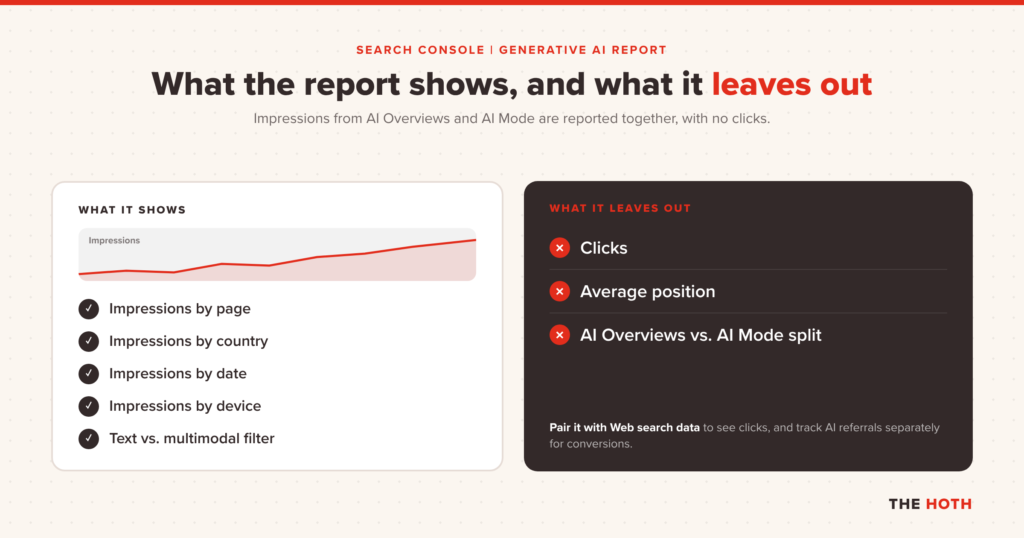
The Search generative AI performance report shows how often links to your site appeared in AI Overviews and AI Mode. You can break impressions down by page, country, date, and device. It does not report clicks, positions, or a split between AI Overviews and AI Mode.
Google introduced the reports in a Search Central blog post in June 2026, tested them with a small group of sites, and finished rolling them out to all websites worldwide on August 31, 2026. There are two: one for Search and one for Discover.
Here’s what’s in the Search version, based on Google’s help page for the generative AI performance report:
- Coverage: Impressions from AI Overviews and AI Mode. Google says the list of features may grow. Search Labs experiments are excluded.
- The metric: Impressions only, meaning the number of times links to your site were shown in a generative AI feature.
- Dimensions: Pages, countries, dates (day, week, or month in Pacific Time), and devices.
- Search type filter: Text-based web searches vs. multimodal searches, such as Google Lens, Circle to Search, and image uploads.
- Limits: The standard 1,000-row table limit applies, and the newest data can be preliminary for a few hours.
The Discover version works the same way for AI features in Google Discover, with one useful detail spelled out on its Discover report help page: a link only counts when it scrolls into view, and only once per result per session.
The three things the report won’t tell you
First, there are no clicks. You can see that your page appeared in an AI answer, but not whether anyone visited because of it.
Second, there’s no position. You won’t know if your link was the first card in the answer or buried in a collapsed source list.
Third, the help documentation lists AI Overviews and AI Mode together and doesn’t describe a filter that separates them. That’s a big deal now that the two surfaces are blending. A rising impression count could mean more Overview citations, more AI Mode citations, or both.
Also worth knowing: if your site has very few AI impressions, the report may not appear at all. An empty report isn’t a bug. It’s a signal.
Where Do AI Mode and AI Overview Clicks Show Up?
Clicks from AI Overviews and AI Mode are counted inside the regular Search Console Performance report under the Web search type, mixed in with classic organic clicks. Google doesn’t offer a filter that isolates AI-driven clicks, so you have to infer them by comparing trends.
Google’s AI features documentation says it plainly: sites that appear in AI features are included in overall search traffic and reported in the Performance report under “Web.” There’s no separate click line for AI.
That creates an odd split. Your AI impressions live in their own report. Your AI clicks are blended into your normal organic clicks. To understand AI performance, you have to read the two side by side.
Google’s position is that the clicks you do get are better. The same documentation says clicks from results pages with AI Overviews are higher quality, with users more likely to spend more time on the site. Treat that as Google’s claim, and then go check it in your own analytics.
For a refresher on the main report itself, our guide to Google Search Console strategies walks through filters, comparisons, and exports.
How Should You Reset Traffic Expectations for AI Mode?
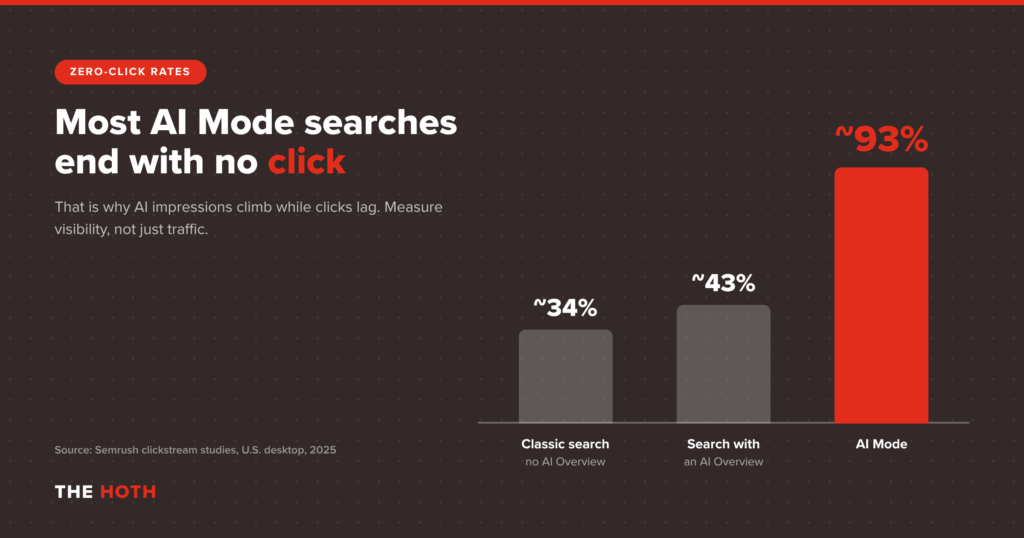
Expect far fewer clicks per impression from AI Mode than from classic results. Semrush’s clickstream study found that 92 to 94 percent of AI Mode searches ended without a visit to another site. Measure AI Mode by visibility and lead quality, not raw sessions.
The most-cited number here comes from Semrush’s study of AI Mode’s impact on SEO. Looking at nearly 69 million U.S. desktop search sessions from May through early July 2025, Semrush found that only 6 to 8 percent of AI Mode sessions led to a visit to an outside domain. That’s roughly a 93 percent zero-click rate.
For comparison, Semrush’s earlier research put zero-click rates for regular Google searches at about 34 percent without an AI Overview and about 43 percent with one. Those came from separate studies using different methods, so treat the gap as directional. But the direction is hard to ignore.
Two caveats before you take that 93 percent figure to a meeting. The data is from 2025, when AI Mode was a sliver of total searches. And it’s desktop only. Behavior on mobile, where Google is pushing the merged experience hardest, could look different. Still, it’s the best public benchmark we have, and it’s directionally right.
What this means for your reporting
If you keep reporting AI performance with the same KPIs you used for blue links, every month is going to look like a loss. Impressions go up, clicks stay flat, and click-through rate sinks.
The fix isn’t to stop caring about traffic. It’s to report AI search as two layers: visibility (are you in the answer?) and value (what happens when people do click?). We dig into the strategic side of this in The Zero-Click Problem: Why AEO Is the Only Rational Response.
Fewer clicks, better clicks: what we saw on our own site
We tracked this shift on our own site. From January 2025 through February 2026, The HOTH grew generative AI traffic by 354 percent, reaching 11,375 sessions, mostly from ChatGPT referrals.
The volume was small next to our organic traffic. The quality wasn’t. Visitors arriving from AI sources converted at 22.79 percent, compared to 2.45 percent for standard organic visitors. That’s about 9 times the conversion rate.
That data is mostly from AI assistants, not Google’s AI Mode specifically, so it’s not a one-to-one match. But it shows the pattern you should plan for: AI surfaces send fewer people, and the people they send arrive further along in their decision. There was no special AI trick behind it, either. It came from consistent content, a steady flow of high-authority digital PR placements, and brand presence across channels.
How Do You Measure AI Search Visibility Step by Step?
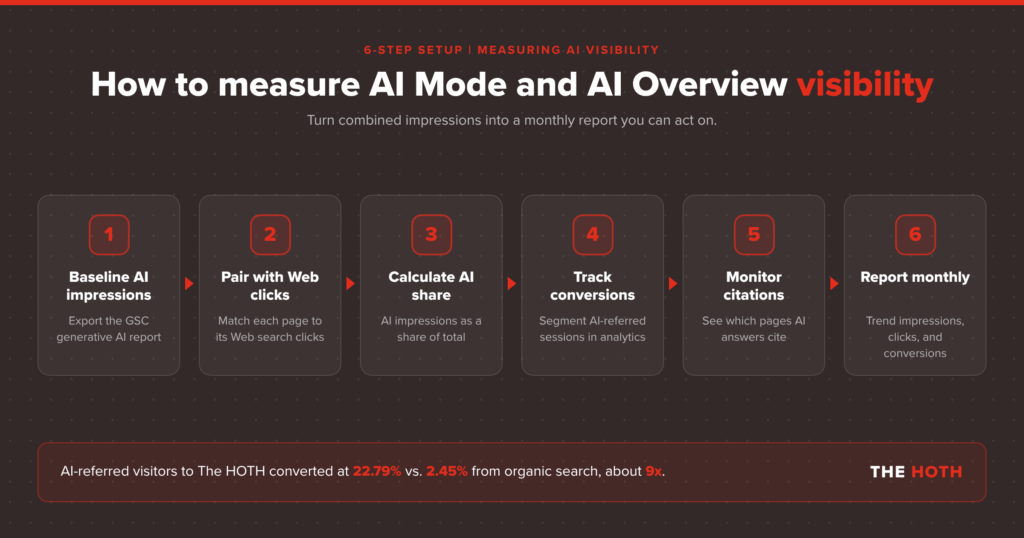
Start with the generative AI report for impressions, compare it against the regular Performance report for the same pages, and track conversions from AI referral sources in your analytics. Then monitor citations directly, since Search Console won’t show where you appear in each answer.
Here’s a measurement setup you can put in place this week.
1. Baseline your AI impressions by page
Export the Pages tab from the generative AI performance report for the last three months. This is your list of pages Google already trusts enough to cite. Sort it by impressions and note your top 20.
2. Pair each page with its Web clicks
Pull the same pages and date range from the regular Performance report, filtered to the Web search type. Now you can see AI impressions next to total clicks and total impressions for each URL.
Look for three patterns. Pages where AI impressions are rising and clicks are holding steady are your wins. Pages where AI impressions are rising and clicks are dropping are where AI answers are likely absorbing the visit. Pages with strong classic impressions but zero AI impressions are your gap list.
3. Calculate a simple AI share of visibility
For each top page, divide its generative AI impressions by its total Web impressions for the same period. The counting rules aren’t identical across reports, so don’t treat it as a precise metric. Use it as a trend line. If the share keeps climbing, more of that page’s visibility is happening inside AI answers.
4. Track conversions, not just sessions
In your analytics platform, set up a channel or segment for AI referral sources such as ChatGPT, Perplexity, Gemini, and Claude. Then compare conversion rate and revenue per user against classic organic. If your results look anything like ours, this is the slide that changes the conversation with leadership.
5. Monitor citations directly
Search Console tells you that you appeared. It doesn’t tell you which question triggered it, how high you sat in the answer, or which competitors were cited next to you. For that, you need a citation tracking tool or a team running it for you. Our tactical guide on how to get cited in AI Overviews breaks down what each engine tends to reward.
6. Build a monthly AI visibility report
Combine the pieces into one view: AI impressions trend, top cited pages, AI share of visibility, AI referral conversions, and notable citation wins or losses. Keep the classic organic report too. You’re adding a layer, not replacing one.
What Should You Optimize Now That the Surfaces Are Merging?
Google says there are no special optimizations required for AI Overviews or AI Mode. The same fundamentals apply: indexable pages, clear answers in text, strong internal linking, and accurate structured data. What matters more now is earning the authority signals that make AI systems pick you as a source.
Google is direct about this in its AI features documentation. There are no extra technical requirements, no special schema, and no new AI text files needed to appear in AI Overviews or AI Mode. If your page is indexed and eligible for a snippet, it’s eligible.
That doesn’t mean nothing changes. It means the competition moves to quality and authority. A few priorities stand out:
- Answer first. Put a clear, liftable answer near the top of each section. AI systems pull from passages, not whole pages.
- Cover the follow-ups. AI Mode is a conversation. Pages that answer the next three questions a searcher will ask have more chances to be cited along the way.
- Keep content current. Stale stats get skipped. A regular content refresh keeps your cited pages worth citing.
- Earn mentions on trusted sites. AI answers lean on sources the web already trusts. Earned media placements on real publications build exactly that kind of signal.
How HOTH AI Discover Helps You Win in the Merged AI Experience
Tracking AI impressions is step one. Getting more of them, on the pages that drive revenue, is the real job.
HOTH AI Discover is our managed program for brands that want to be cited in AI Overviews, AI Mode, and AI assistants like ChatGPT. It combines the work that moves AI visibility: digital PR and earned media, link building, content optimization and refresh, and review and reputation signals.
It also fills the gap Search Console leaves. AI Discover includes visibility tracking through our Atlas dashboard, which shows where your brand appears across AI Overviews, search results, and LLM responses, plus regular strategy sessions to turn that data into next steps.
It’s the same approach we used to grow our own AI traffic 354 percent. No hacks, just consistent authority building measured through an AI lens.
FAQ: AI Mode vs. AI Overviews
Is AI Mode replacing AI Overviews?
Not officially. Google still runs both, but it now routes AI Overview follow-ups into AI Mode and expands some Overviews by default, so many searchers move from one to the other in a single session.
Does Search Console separate AI Mode from AI Overviews?
Not in the generative AI performance report. Google’s help documentation lists both features under one impressions metric and doesn’t describe a filter that splits them.
Does the generative AI report show clicks?
No. It reports impressions only. Clicks from AI Overviews and AI Mode are counted in the regular Performance report under the Web search type, combined with classic organic clicks.
Why can’t I see the generative AI report in my Search Console?
Google says the report usually doesn’t appear when a site has too few generative AI impressions. It also may not appear if your site is excluded from these features.
Do I need special schema or an AI text file to appear in AI Mode?
No. Google says there are no additional requirements or special optimizations for AI Overviews or AI Mode. Standard SEO best practices apply.
The Bottom Line
AI Overviews and AI Mode are turning into one connected experience. Search Console now shows your impressions there, but not your clicks. Measure AI search by visibility and lead quality, and keep investing in the authority that gets you cited.
Google is folding its AI surfaces together faster than most reporting setups can keep up. The new generative AI report is a real step forward, but it’s an impressions report in a world where impressions and visits are drifting apart.
So change the scorecard. Track whether you’re in the answer, which pages earn citations, and how AI-referred visitors convert. Then put your effort into the content and authority that keep you there.
Want help figuring out where you stand in AI search right now? Book a free strategy call with our team and we’ll walk through your AI visibility together.
Leave a comment