
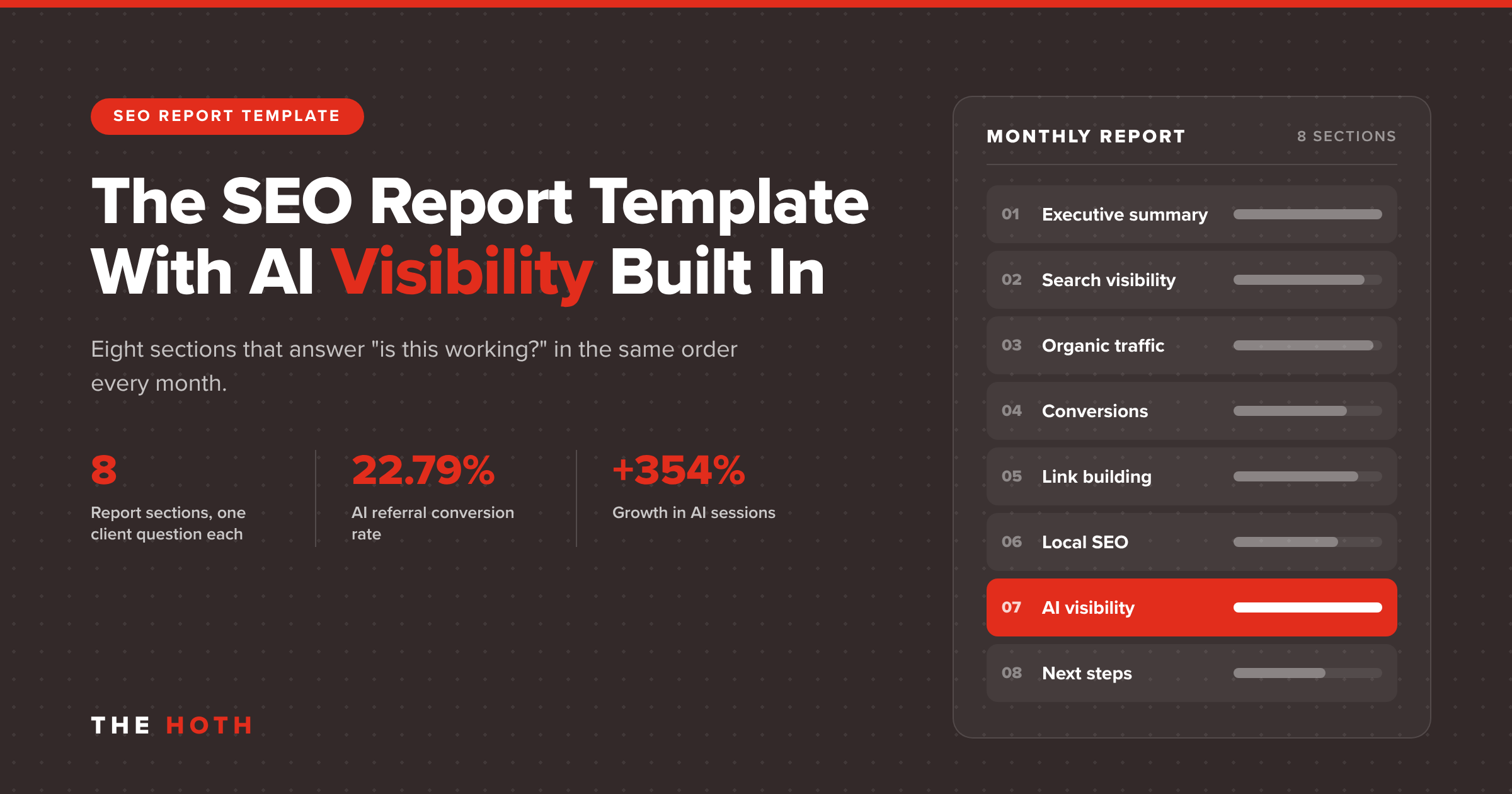

An SEO report template is a fixed structure you fill in every month so clients see the same sections in the same order: an executive summary, search visibility, organic traffic, conversions, link building, local SEO, AI visibility, and next steps. The AI visibility section is the one most templates still skip.
Your client opens the monthly report, scrolls past three pages of charts, and asks one question on the call: “So is this working?”
If the report can’t answer that in the first 30 seconds, it isn’t doing its job. And there’s a newer problem on top of that one. A growing share of searches end in an AI answer instead of a click.
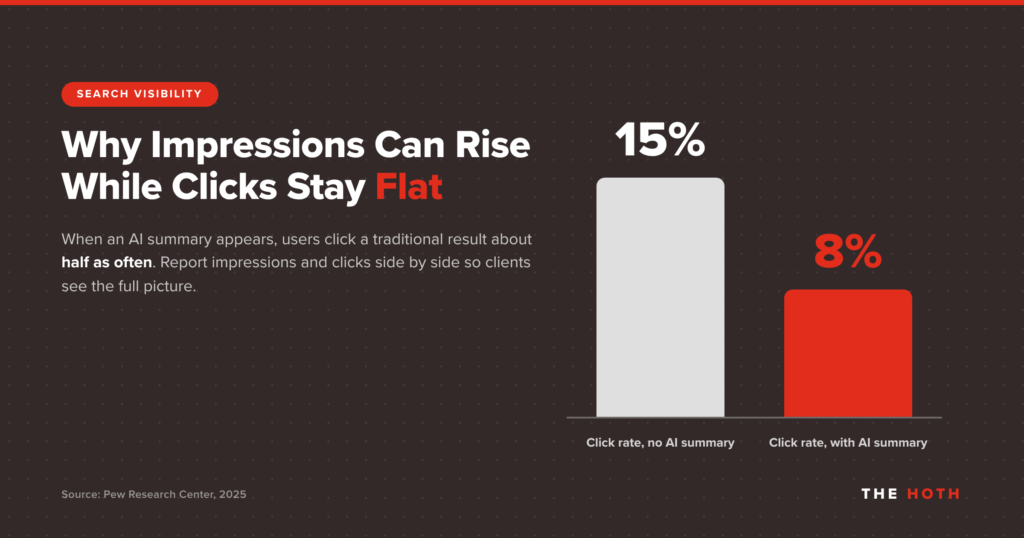
Pew Research Center’s study of real Google browsing data found that people clicked a traditional search result on 8% of visits when an AI summary appeared, compared with 15% when one didn’t. Your client’s brand can be showing up more often while their click chart looks flat.
That’s why the template below has eight sections instead of the usual five or six. It covers the classic SEO metrics clients expect, plus a section that shows where the brand appears in AI Overviews, AI Mode, and assistants like ChatGPT.
Here’s what each section should include, where the data comes from, and how to keep the whole thing readable for a client who has five minutes, not fifty.
What Should an SEO Report Template Include?
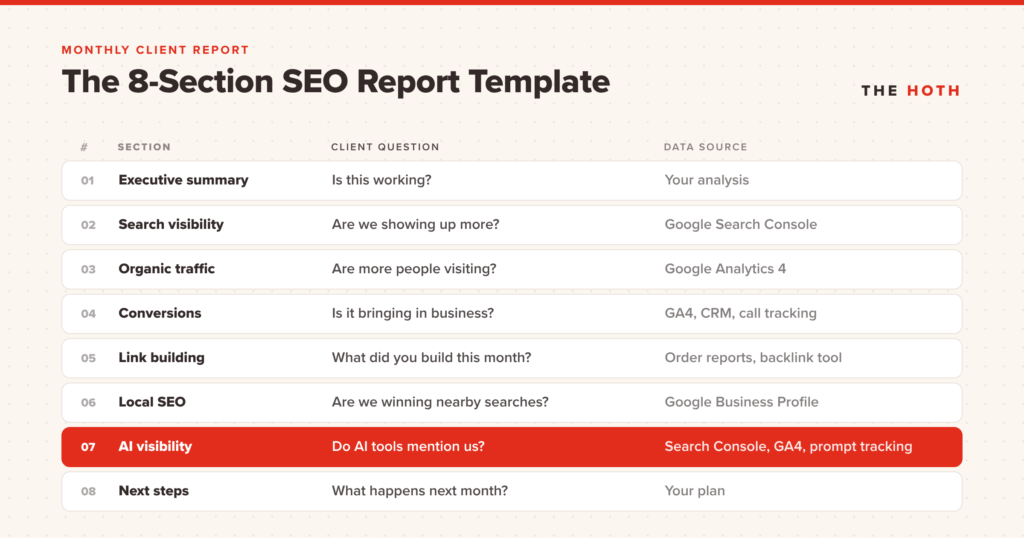
A complete monthly SEO report template has eight sections: executive summary, search visibility, organic traffic, conversions, link building, local SEO, AI visibility, and next steps. Each section should answer one client question and pull from one primary data source.
| Section | The client question it answers | Primary data source |
|---|---|---|
| 1. Executive summary | Is this working? | Your analysis |
| 2. Search visibility | Are we showing up more? | Google Search Console |
| 3. Organic traffic | Are more people visiting? | Google Analytics 4 |
| 4. Conversions | Is it bringing in business? | GA4, CRM, call tracking |
| 5. Link building | What did you build this month? | Order reports, backlink tool |
| 6. Local SEO | Are we winning nearby searches? | Google Business Profile |
| 7. AI visibility | Do AI tools mention us? | Search Console, GA4, prompt tracking |
| 8. Next steps | What happens next month? | Your plan |
Drop sections that don’t apply. A national ecommerce brand with no storefront doesn’t need a local section, and a brand-new site with no links yet can fold link building into next steps.
What you shouldn’t do is reshuffle the order every month. Consistency is what lets a client compare this month to last month without your help.
How Do You Write the Executive Summary?
Write the executive summary last, keep it to three to five sentences, and cover what changed, why it changed, and what you’re doing next. Lead with the business result, not the SEO metric.
This is the only section some clients will read, so treat it like the whole report in miniature. A simple formula works: one sentence on the headline result, one on the cause, one on any problem, and one on next month’s focus.
Here’s an example, with placeholder numbers:
Organic leads rose to 42 this month, up from 31 last month, driven by the two service pages we refreshed in week two. Impressions in Google’s AI features grew as well. One priority keyword slipped from position 4 to 7 after a competitor published a longer guide, and we’re updating our page to respond. Next month we’re focused on the pricing page and three new links to the services hub.
Notice what’s missing: jargon. Skip “DR,” “SERP features,” and “crawl budget” up top. If a term needs explaining, it belongs further down the report.
Which Search Visibility Metrics Belong in an SEO Report?
Report clicks, impressions, click-through rate, and average position from Google Search Console, plus movement for a short list of priority keywords grouped by topic or service. Skip the 400-row ranking export.
Google Search Console’s Performance report gives you four core numbers: clicks, impressions, CTR, and average position. Show each one month over month and year over year, so cyclical swings don’t read as wins or losses.
For rankings, pick 10 to 25 priority keywords and group them by service or topic. A table with the keyword, last month’s position, this month’s position, and the ranking URL tells the story. A full export of every keyword the site ranks for tells the client you didn’t have time to edit.
One pattern to call out when you see it: impressions climbing while clicks stay flat. That used to point to a title tag or CTR problem. Now it can also mean the page is showing up in an AI Overview that answers the question right on the results page.
Google says pages that appear in its AI features are counted in the overall Search Console traffic under the Web search type. So that impression growth is real visibility, even when it doesn’t become a visit. Explain it in one sentence so the client doesn’t read flat clicks as failure.
How Should You Report Organic Traffic and Conversions?
Report organic sessions and engaged sessions from GA4, then tie them to the conversions the client cares about: form fills, calls, purchases, or booked demos. Break out AI assistant referrals as their own line so that traffic doesn’t get lost in the totals.
Traffic is a means to an end, so put these two sections side by side. Show organic sessions, the top landing pages, and the conversions those pages produced. If the client has a CRM, add pipeline or closed revenue from organic leads, even if it’s a rough number.
GA4 makes the AI piece easier than it used to be. Its default channel group definitions include an AI Assistant channel for visitors who arrive from tools like ChatGPT, Gemini, and Copilot, while traffic from Google’s AI Overviews and AI Mode stays in Organic Search. Add an “AI assistant sessions” row next to organic search so the client sees both.
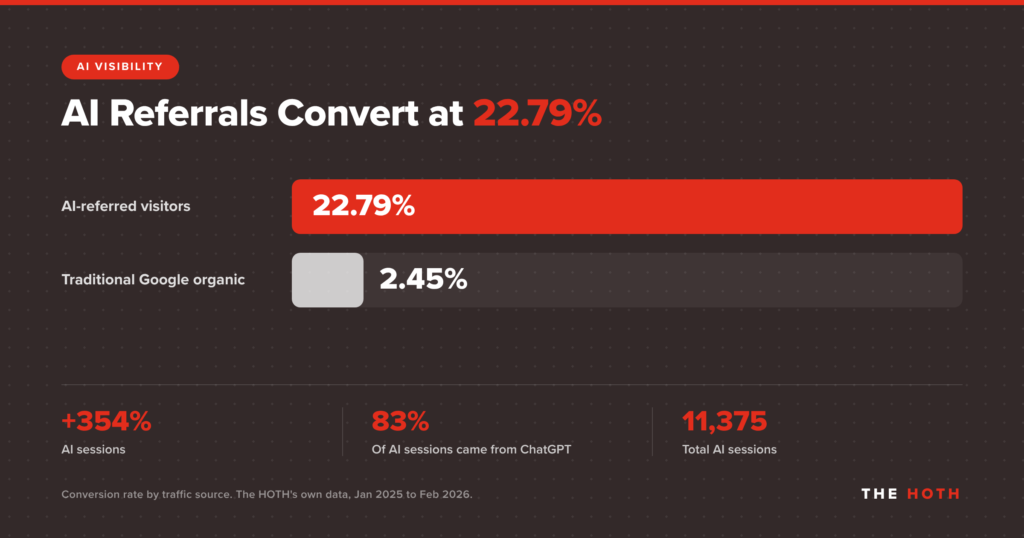
That row matters more than its size suggests. When The HOTH tracked its own generative AI traffic from January 2025 to February 2026, AI sessions grew 354%. Visitors arriving from AI recommendations converted at 22.79%, compared with 2.45% for traditional Google organic, and ChatGPT sent 83% of those AI sessions.
Your clients’ numbers will differ. But a small traffic source with a high conversion rate is a trend worth showing early, before anyone asks.
What Link Building Results Should You Show Clients?
Show the links delivered this month with the linking site, the page it points to, and the date it went live, plus the referring domain trend over time. Clients want proof of work and proof of momentum.
Link building is the part of SEO clients can’t see happening, so this section does a lot of trust-building. Include:
- The placements delivered this month, with the publication, target URL, and live date
- Net new referring domains, compared with last month
- Lost or removed links, and what you’re doing about them
- Which pages received links, and why those pages were the priority
Keep link metrics in context. A jump in referring domains matters because it supports the pages that drive leads, so connect this section back to rankings and conversions whenever you can.
If a partner handles fulfillment, whether that’s link outreach, content, or managed SEO, ask for reports you can drop straight into this section under your own brand. It saves hours of reformatting every month.
How Do You Report Local SEO Results?
For clients with a physical location or service area, pull profile views, searches, calls, direction requests, and website clicks from Google Business Profile, then add review count, average rating, and review response rate.
Google Business Profile’s performance report shows how people found and interacted with a profile: searches, views on Search and Maps, calls, direction requests, and website clicks. Those are the closest thing local SEO has to conversions, so put them at the top of this section.
Add a reviews row underneath. Track total reviews, new reviews this month, average rating, and the share of reviews that got a response. Reviews shape Map Pack visibility and how AI tools describe a local business, so they deserve a regular spot in the report, not just a mention when something goes wrong.
When those numbers need a push, The HOTH’s local SEO services cover Map Pack visibility, Google Business Profile optimization, and citation cleanup.
How Do You Add AI Visibility to an SEO Report?
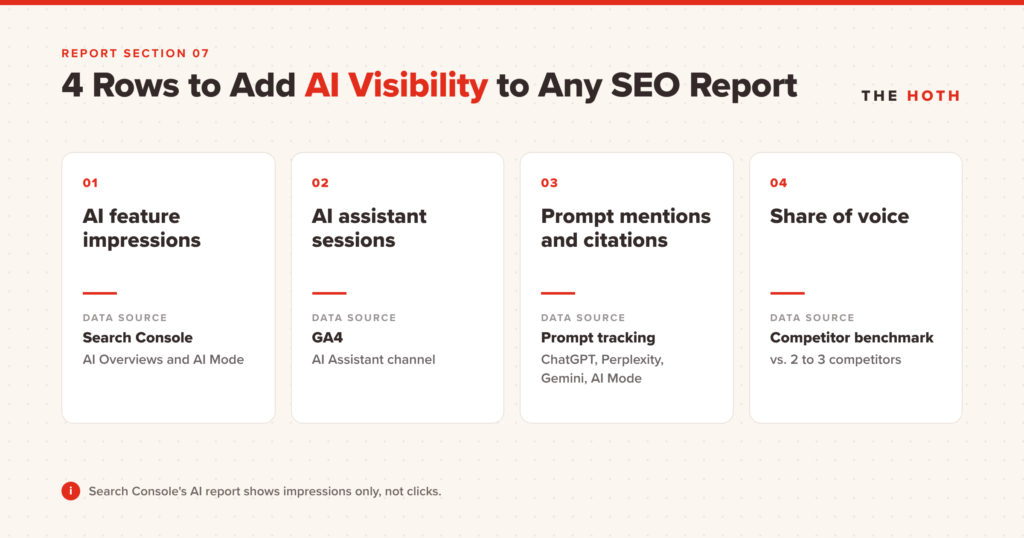
Add four rows: impressions in Google’s AI features from Search Console, AI assistant sessions from GA4, how often a fixed set of prompts mentions or cites the brand in tools like ChatGPT and Perplexity, and how that compares with two or three competitors.
This is the section most templates are missing, and it’s the one clients are starting to ask about. (If you’re still making the internal case for it, here’s why SEO reporting has to go beyond traffic.) Build it from four rows.
AI feature impressions from Search Console
Google announced generative AI performance reports for Search Console in June 2026. The Search version of the report shows how often a site’s pages appeared in AI Overviews and AI Mode, broken out by page, country, device, and date, and Google says it was rolled out to all websites worldwide as of August 31, 2026.
Add two caveats to your report notes. The report shows impressions only, not clicks, and sites with too few AI impressions won’t see it at all.
AI assistant sessions from GA4
Pull the AI Assistant channel you set up in the traffic section, and break it down by source here. The client sees which assistants send visitors and which pages they land on.
Prompt-level mentions and citations
Pick 10 to 20 prompts a real buyer would ask, like “best family law attorney in Denver” or “what’s the best project management tool for a small agency.” Run them each month in ChatGPT, Perplexity, Gemini, and Google AI Mode.
For each answer, record whether the brand is mentioned, whether it’s linked as a source, and which competitors show up. You can do this by hand or with an AI visibility tracking tool. Keep the prompt list fixed so month-over-month changes mean something.
Share of voice against competitors
Turn the prompt results into one number: the percentage of prompts where the client appears, next to the same figure for two or three competitors. “You show up in 6 of 20 answers, and your main competitor shows up in 11” lands faster than any chart.
Why bother while AI traffic is still small? Google says that when people click from search results pages with AI Overviews, those clicks are higher quality, and visitors are more likely to spend more time on the site. Your report should show where that visibility comes from before a competitor’s agency does.
For a longer list of AI metrics, see our guide to AI visibility reporting. And when the numbers show a gap, AI Discover is The HOTH’s service for earning the citations and mentions that get brands recommended in AI answers, with a dashboard that tracks where the brand appears across AI Overviews, search results, and LLM responses.
What Goes in the Next Steps Section?
The next steps section lists the work completed this month, the work planned for next month, anything you need from the client, and any risks. It turns the report from a scorecard into a plan.
End every report with four short lists:
- Completed: the content, links, technical fixes, and profile updates you shipped
- Planned: next month’s priorities, tied to the problems the report surfaced
- Needed from the client: approvals, access, photos, product details, or expert input
- Watch list: risks like an algorithm update, a competitor push, or a page that slipped
The “needed from the client” list is underrated. It makes delays visible and spreads ownership of the results, which is a big part of setting client expectations that hold up over a long engagement.
What Does a Complete SEO Report Template Look Like?
Here’s the full template in one place. Copy the structure into your reporting tool, slide deck, or doc, and fill in the fields each month.
| Section | Fields to fill in |
|---|---|
| 1. Executive summary | Headline result, main cause, any problem, next month’s focus (three to five sentences) |
| 2. Search visibility | Clicks, impressions, CTR, and average position, month over month and year over year; 10 to 25 priority keywords with last month’s position, this month’s position, and ranking URL |
| 3. Organic traffic | Organic sessions, engaged sessions, top five landing pages, AI Assistant sessions |
| 4. Conversions | Leads, calls, purchases, or demos from organic; pipeline or revenue if available |
| 5. Link building | Placements delivered (publication, target URL, live date); net new referring domains; lost links |
| 6. Local SEO | Profile views, searches, calls, direction requests, website clicks; total reviews, new reviews, average rating, response rate |
| 7. AI visibility | AI feature impressions (Search Console); AI Assistant sessions by source (GA4); prompt set results; share of voice vs. two or three competitors |
| 8. Next steps | Completed, planned, needed from the client, watch list |
How Do Agencies Deliver SEO Reports at Scale?
Agencies scale reporting by locking one template, automating the data pulls, and outsourcing fulfillment to a partner whose work arrives with white-label reports. The analysis and the client conversation stay in-house.
Building one great report is easy. Building 40 of them every month, on time, is where agencies stall. A few habits keep it manageable:
- Use the same template for every client, and only toggle sections on or off
- Automate the data pulls from Search Console, GA4, and Business Profile into your dashboard tool
- Spend your time on the executive summary and next steps, since that’s where clients see your expertise
- Send a short recorded walkthrough with the report for clients who won’t read it
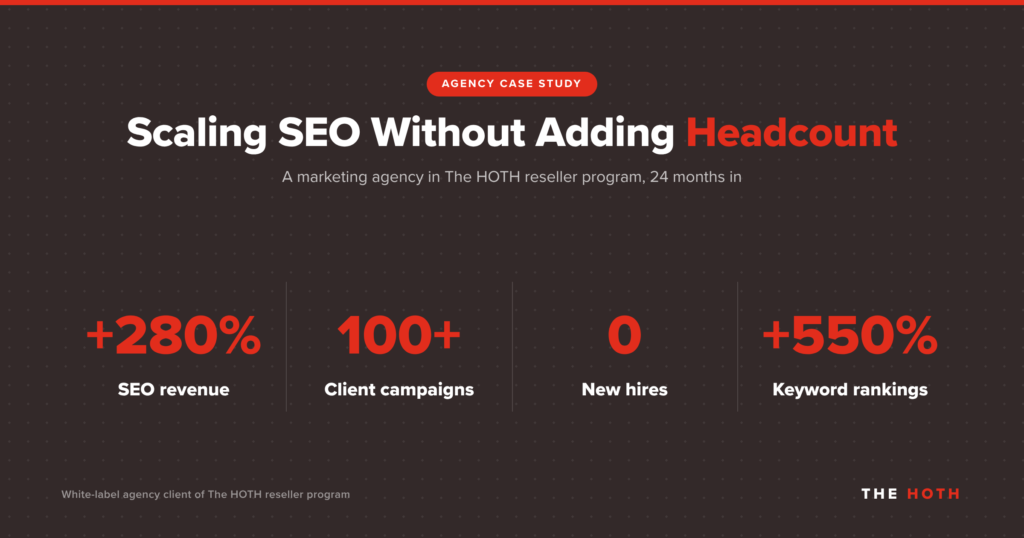
Fulfillment is the other bottleneck. One marketing agency in The HOTH’s white-label reseller program grew its SEO revenue 280% over 24 months while managing 100+ client campaigns, with zero new hires.
White-label reporting was part of that setup. The agency sent clients reports under its own brand without building a reporting team, and keyword rankings across its campaigns increased 550%.
For prospects and brand-new clients, you can also run the free SEO Report Tool to generate a quick on-page snapshot that opens the conversation. Once the engagement starts, move them onto your monthly template.
Want White-Label SEO Reports Without Building Them Yourself?
The HOTH’s reseller program pairs wholesale SEO fulfillment with fully private-label reports, so you can deliver this template to every client without adding staff.
You bring the client relationship and the strategy. We handle the link building, content, and managed SEO behind it, with reports that carry no HOTH logos, phone numbers, or “powered by” footers. Add your own branding, export in the format you need, and send it.
Become a HOTH reseller and start sending reports your clients will read.
SEO Report Template FAQs
How often should you send an SEO report?
Monthly works for most clients. SEO moves slowly enough that weekly reports mostly show noise, and quarterly reports leave clients wondering what you’re doing. Add a quarterly review that steps back to strategy.
What’s the difference between an SEO report and an SEO audit?
An audit is a one-time diagnosis of a site’s technical, on-page, and off-page health. A report tracks progress against goals every month. Most engagements start with an audit, then move to monthly reports.
Can Google Analytics track traffic from ChatGPT?
Yes. GA4’s default channel grouping includes an AI Assistant channel for visitors from tools like ChatGPT, Gemini, and Copilot. Traffic from Google’s AI Overviews and AI Mode counts as Organic Search.
Does Search Console show clicks from AI Overviews?
Not separately. Clicks from AI features are included in the regular Performance report under the Web search type. The generative AI performance report shows impressions in AI Overviews and AI Mode, but not clicks.
How long should an SEO report be?
Short enough to read in five minutes. Aim for one page or slide per section with the executive summary up top, and move detailed tables to an appendix for clients who want them.
What’s the Bottom Line on SEO Report Templates?
A good SEO report template answers three client questions in the same order every month: Is this working, why, and what’s next?
The eight sections above cover the classic metrics clients expect and the AI visibility data they’re starting to ask about. Build it once, keep it consistent, and spend your time on the analysis instead of the formatting.
If fulfillment is what’s keeping you from scaling, The HOTH’s reseller program can take it off your plate.
Leave a comment