

Restaurant SEO is the work of getting your restaurant in front of people who are deciding where to eat, on Google Search, Google Maps, and AI assistants like ChatGPT. It runs on four things: a complete Google Business Profile, a steady flow of recent reviews, consistent listings across the web, and a website that spells out your menu, hours, and location in a way machines can read.
Picture someone standing on a sidewalk at 6:45 on a Friday night. They’re hungry, they’re with two friends, and they’ve got about ninety seconds of patience left. They type “tacos near me,” check three star ratings, scroll a few photos, and tap “Directions.”
That whole decision happens before anyone visits your website. It happens on a map listing, in a stack of reviews, and more and more often inside an AI answer that names two or three places and skips the rest.
If your restaurant isn’t one of those names, it doesn’t matter how good the short rib is. You weren’t in the running.
This guide covers how restaurant SEO works today, what happened when one restaurant group built its online presence from zero, and a 30-day plan you can start this week.
What Is Restaurant SEO, and How Is It Different From Regular SEO?
Restaurant SEO is local SEO with a shorter decision window. Most diners choose a restaurant within minutes, based on what they see in Google Maps, review sites, and AI answers, so your listings and reviews do more of the selling than your website does.
A roofing customer might compare quotes for a week. Restaurants rarely get that luxury. The search is often local, mobile, and immediate: “pizza open now,” “best ramen downtown,” “restaurants with patio seating.”
That changes where your effort should go. For most restaurants, the priority order looks like this:
- Your Google Business Profile. For a lot of diners, it’s the only page about you they’ll ever see.
- Your reviews. Star rating, review count, and how recent the reviews are all shape whether someone picks you.
- Your listings everywhere else. Apple Maps, Yelp, Tripadvisor, Facebook, and dozens of directories feed both search engines and AI tools.
- Your website. It still matters, mostly as the source of truth for your menu, hours, and location, and as a place to capture reservations and orders.
Content and link building have a role, especially for multi-location groups and competitive cities. But if your profile is half-finished and your newest review is from last year, that’s where the wins are.
How Does Google Decide Which Restaurants Show Up in the Map Pack?
Google ranks local results on three main factors: relevance, distance, and prominence. You can’t change how far a diner is from your door, so restaurant SEO focuses on making your profile clearly relevant to what people search and building the reviews and mentions that make you prominent.
Google lays this out plainly in its own help documentation on how to improve your local ranking on Google. Here’s what each factor means for a restaurant:
Relevance: Does Your Listing Match the Search?
Relevance is how well your profile lines up with what someone typed. If a diner searches “vegan brunch” and your profile lists you as a generic “Restaurant” with no mention of brunch or plant-based dishes, Google has very little to connect you to that search.
Your primary category, secondary categories, attributes, menu items, and the words people use in their reviews all feed relevance.
Distance: The Factor You Can’t Control
You can’t move your building, but you can make sure your address and map pin are accurate so Google isn’t guessing wrong about where you are.
Prominence: How Well Known Are You?
Prominence is where most of your competitive edge lives. Google’s documentation says it draws on how many websites link to you and how many reviews you have, and that more reviews and positive ratings can help your local ranking. Local press coverage, food blog mentions, and “best of” lists also add to it.
Google also states that you can’t pay for a better local ranking. That’s useful to remember the next time someone emails you a guarantee for the number one spot in the map pack.
For a deeper look at how the map pack works across industries, our guide on how to rank in Google Maps walks through the full ranking picture.
How Do You Set Up a Google Business Profile That Turns Searches Into Reservations?
A restaurant’s Google Business Profile should be complete, accurate, and active: the right primary category, correct hours including holiday hours, a structured menu, real photos, and regular posts. Google says complete and accurate profiles are more likely to show up in local results.
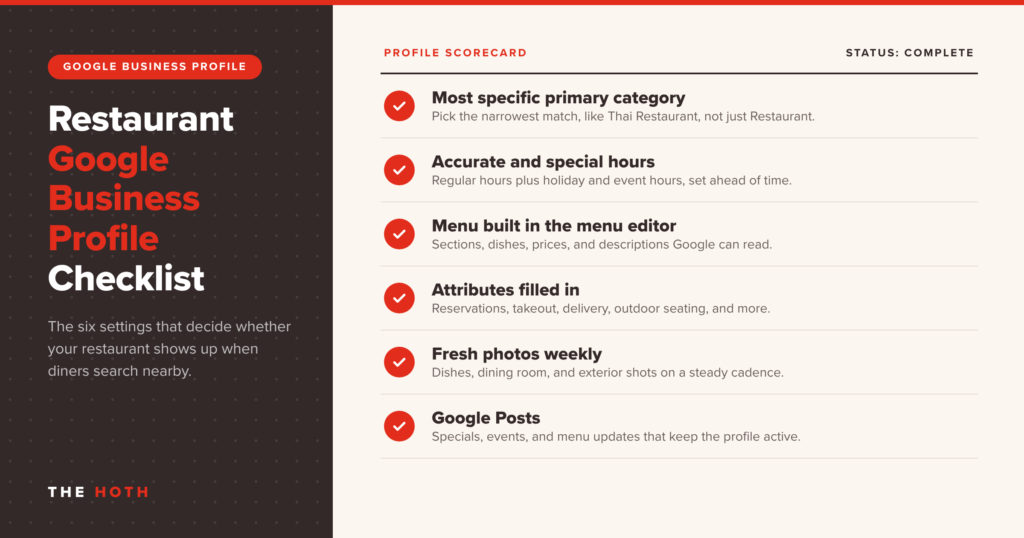
Your profile is your storefront on Google. Here’s what to get right.
Pick the Most Specific Category You Can
“Restaurant” is a category. So are “Neapolitan pizza restaurant,” “Ramen restaurant,” and “Breakfast restaurant.” Your primary category carries the most weight, so choose the one that best describes what most guests come in for, then add secondary categories for anything else you’re known for, like a bar, catering, or takeout.
Keep Hours Accurate, Especially Special Hours
Nothing burns trust faster than a locked door. Set special hours ahead of every holiday or private event. Google’s ranking guidance calls out accurate hours, including special hours, as part of a complete profile.
Use the Menu Editor, Not Just a PDF
Google offers a dedicated menu editor for food and drink businesses that lets you add sections, individual items, descriptions, and prices right on your profile. You can still upload menu photos and add a link to the menu on your website, and you should do all three.
Structured menu items give Google something concrete to match against dish-level searches like “birria tacos” or “gluten-free pasta.” A blurry photo of a laminated menu doesn’t do that nearly as well.
Fill In Attributes That Diners Filter By
Outdoor seating, reservations, wheelchair access, happy hour, vegetarian options: attributes are how your listing shows up when someone narrows a search. Fill in every one that applies.
Post Photos and Updates on a Regular Schedule
Fresh photos of your actual food, dining room, and patio do more than any stock image ever will. Add new ones every week or two, along with Google Posts about specials, new menu items, and events.
If you run more than one location, every location needs its own fully built profile. Our guide to multi-location SEO covers how to keep that manageable.
Why Do Reviews Matter So Much for Restaurant SEO?
Reviews are both a ranking factor and the deciding factor. They feed Google’s prominence signal, and diners use star ratings, review count, and recency to choose between restaurants. Recent reviews and real owner responses matter almost as much as the rating itself.
Diners read reviews constantly, and their standards keep rising. BrightLocal’s Local Consumer Review Survey 2026, based on a survey of just over 1,000 US consumers, found that nearly all consumers read reviews for local businesses, and the share who say they will only use businesses rated 4.5 stars or higher nearly doubled from the prior year to about a third of respondents.
Two other findings from that survey should shape how you run reviews:
- Recency wins. About three quarters of consumers say they only care about reviews from the last three months. A pile of glowing reviews from two years ago won’t carry you.
- Volume has a floor. Nearly half said they won’t use a business with fewer than 20 reviews. If you’re under that number, building reviews is your first job.
How to Get More Restaurant Reviews Without Breaking the Rules
The best review strategy is a system: ask every guest, make it easy, and do it while the meal is fresh. For example:
- Send a short review request by text or email after a reservation, takeout order, or delivery.
- Put a QR code that links to your Google review form on receipts, check presenters, or takeout bags.
- Train servers to mention it at the end of a great meal, without pressure and without asking for a specific rating.
There are hard lines here, and they’re getting enforced. Google’s Maps user-generated content policy prohibits offering discounts, free items, or payment in exchange for reviews, and it bans selectively asking only happy customers to leave reviews, a practice usually called review gating. Asking everyone is fine. Filtering who gets asked is not.
In the US, the Federal Trade Commission also finalized a rule banning fake reviews and testimonials in August 2024. It covers buying reviews, incentives tied to positive or negative sentiment, undisclosed reviews from owners and staff, and tactics that suppress negative reviews. A free dessert for a five-star review now carries real legal risk, not just a policy strike.
We go deeper on safe, scalable tactics in our guide on how to get Google reviews.
Respond to Reviews Like a Host, Not a Robot
Google’s own ranking guidance says replying to reviews shows customers you value their feedback. Diners notice too. The BrightLocal survey found that a large majority of consumers expect owners to respond, and half are put off by templated, generic replies.
Thank people by name when you can, mention something specific from their visit, and keep it short. For negative reviews, acknowledge the problem, skip the defensiveness, and offer to make it right offline. Our guide to responding to bad Google reviews has examples you can adapt.
What This Looks Like When It Works
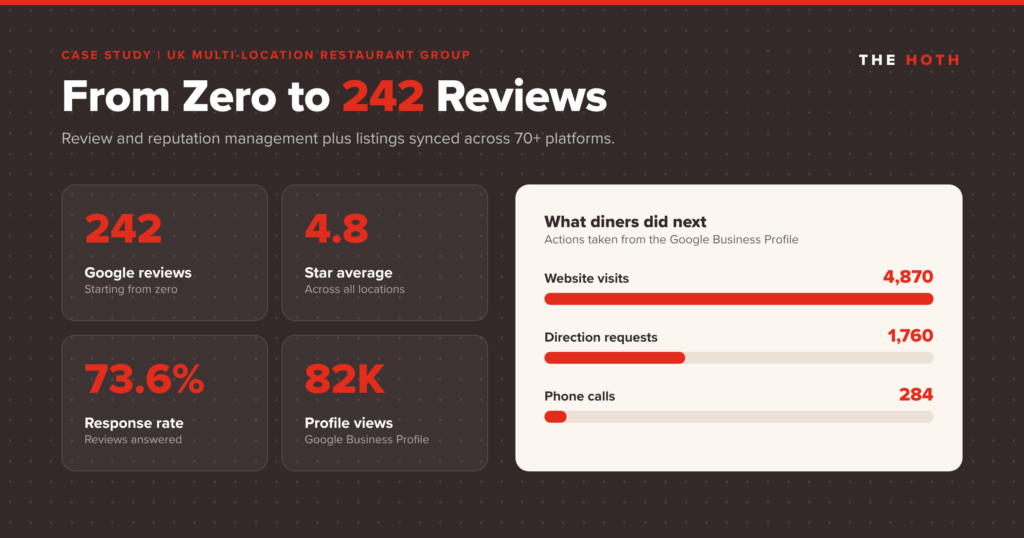
One multi-location restaurant group in the UK came to The HOTH with strong word of mouth and almost no online footprint: no Google reviews, no optimized business profile, and no organic visibility. Diners searching for a place to eat simply couldn’t find them.
Through our managed review and reputation program, the group ran automated review requests by SMS and email, rebuilt and optimized its Google Business Profiles across every location, and synced its business information across more than 70 listing platforms. The results:
- 242 Google reviews built from zero, with a 4.8-star average rating
- A 73.6% review response rate, so prospective diners saw an engaged owner, not silence
- 82,000 profile views on Google Business Profile
- 4,870 website visits, 1,760 direction requests, and 284 phone calls driven from the profiles
Every one of those direction requests is a likely walk-in, and every call is a likely reservation. None of it came from ad spend. It came from consistent reputation work, done every week.
Does Your Restaurant Website Still Matter for SEO?
Yes. Your website is the source of truth that Google, review sites, and AI assistants check your listings against. It should show your menu as real text, list your address and hours on every location page, load fast on phones, and use Restaurant schema markup so machines can read the details.
Many restaurant websites look great and say very little to Google: a full-screen video, a menu locked in a PDF, an address buried in an image.
Put Your Menu on the Page as Text
A text-based HTML menu lets search engines and AI tools see what you serve. Keep a PDF if guests like it, but make the HTML version primary.
Add Restaurant Schema Markup
Schema markup is code that tells search engines exactly what’s on your page. The Schema.org Restaurant type sits under FoodEstablishment and LocalBusiness and supports properties like servesCuisine, hasMenu, acceptsReservations, priceRange, and opening hours.
Google’s local business structured data documentation recommends using the most specific business type you can, gives Restaurant as an example, and lists menu, servesCuisine, and opening hours among its recommended properties. If you’re new to markup, our walkthrough on adding local schema markup covers the basics.
Build a Real Page for Every Location
Each location should have its own page with the full address, phone number, hours, a map, parking or transit notes, and anything unique about that spot. Link each Google Business Profile to its matching location page, not your homepage. That consistency helps Google and AI tools connect the right listing to the right place.
How Do AI Assistants Decide Which Restaurants to Recommend?
AI assistants recommend restaurants by pulling from sources they trust: business listings, review platforms, map data, and local coverage. Restaurants with consistent information across many listings, a strong volume of recent reviews, and specific details about what they serve are easier for AI tools to find, verify, and recommend.
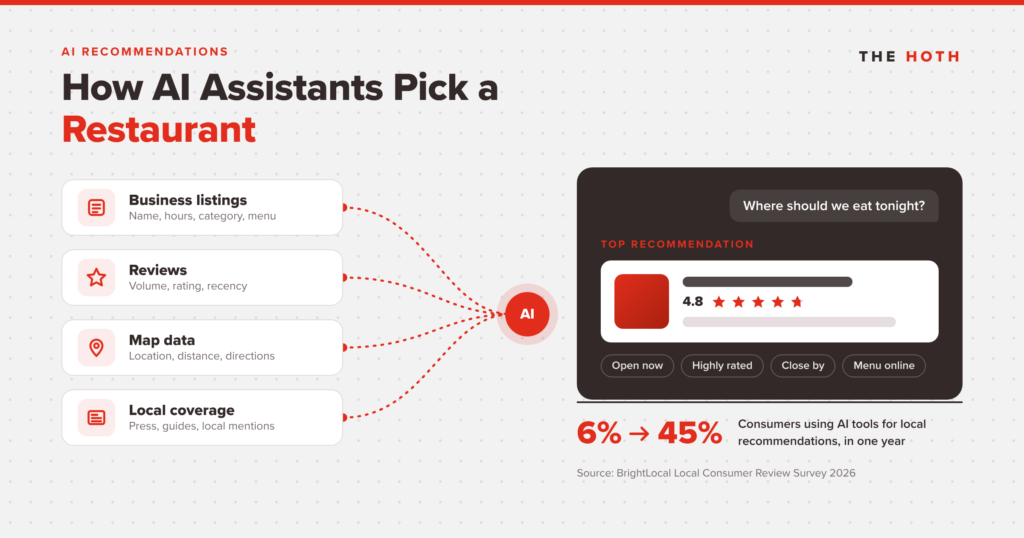
This shift is moving fast. In BrightLocal’s 2026 survey, the share of consumers using ChatGPT and other AI tools for local business recommendations jumped from 6% to 45% in a single year, making AI the third most popular source behind traditional platforms.
Those recommendations draw on reviews and listings, so the fundamentals in this guide double as your AI strategy:
- Consistent listings build confidence. When your name, address, phone number, and hours match across Google, Apple Maps, Yelp, Tripadvisor, and dozens of directories, AI tools have an easier time confirming you’re real and current. We broke this down in Local Listings Are Now an AI Trust Signal.
- Review content gives AI something to quote. A review that says “the patio is dog friendly and the carbonara is the best in town” hands an assistant two specific reasons to recommend you. Our research on how reviews influence AI recommendations goes further into this.
- Specific details match specific prompts. Diners ask AI tools highly detailed questions. Listing your attributes, dishes, dietary options, and atmosphere gives the AI the raw material to match you to those requests.
The same survey found that most consumers now read AI-generated review summaries. Those summaries are built from what your guests write, which is one more reason to keep fresh, detailed reviews coming in.
What Should a Restaurant Do First? A 30-Day Restaurant SEO Plan
Start with the listing diners see most: claim and complete your Google Business Profile in week one, start a review request system in week two, fix inconsistent listings across major directories in week three, and update your website menu, location pages, and schema in week four.
Here’s a realistic order of operations for one location. Repeat the profile and listing work for each additional location.
Week 1: Lock Down Your Google Business Profile
- Claim and verify your profile if you haven’t, and confirm your map pin is in the right spot.
- Set your most specific primary category and add relevant secondary categories.
- Update regular hours and add special hours for upcoming holidays.
- Build your menu in the menu editor and add your website menu link.
- Upload at least ten recent, real photos of food, interior, and exterior.
Week 2: Start a Review System
- Set up an automated text or email review request after reservations and orders.
- Add a review QR code to receipts or takeout packaging.
- Reply to every review from the past few months, positive and negative.
- Brief your staff on what’s allowed: ask everyone, never offer a reward, never filter.
Week 3: Clean Up Your Listings
- Check your name, address, phone, and hours on Apple Maps, Yelp, Tripadvisor, Facebook, and your reservation and delivery platforms.
- Fix mismatches, close duplicate listings, and update any old phone numbers or addresses.
Week 4: Tune Up Your Website
- Publish your menu as HTML text, not only a PDF.
- Make sure each location has its own page with address, hours, and a map.
- Add Restaurant schema markup and test it in Google’s Rich Results Test.
- Check that your site loads quickly on a phone and that the reservation or order button is easy to find.
After the first month, the job becomes maintenance: new photos, weekly posts, consistent review requests, and fast responses. That ongoing work is where most restaurants slip, and where steady operators pull ahead.
How Can The HOTH Help With Restaurant SEO?
The HOTH’s Review and Reputation Management service handles the ongoing work that moves restaurant rankings: automated review requests, personalized review responses, Google Business Profile posts and photos, and listing sync across 70+ directories, managed for you every week.
Most owners know what they should be doing online. The problem is time, and replying to reviews slides to the bottom of the list. If you’re weighing whether to hand it off at all, our review management services buyer’s guide covers what to look for in any provider.
That’s what our Review and Reputation Management service is built for. Our team runs review request campaigns to your guest list, writes personalized responses to your reviews, keeps your Google Business Profile active with regular posts and photos, keeps your information in sync across more than 70 directories, and monitors for spam or policy-violating reviews. It’s the same playbook that took the restaurant group above from zero reviews to 242.
If you also need cleanup on old citations or stronger location pages, our local SEO services cover those pieces too.
Restaurant SEO FAQ
How long does restaurant SEO take to work?
Profile and listing fixes can show up in local results within weeks, while review volume and prominence build over several months. The restaurant group in our case study built its review base and profile performance steadily rather than overnight. Consistency matters more than any single change.
How many Google reviews does a restaurant need?
There’s no magic number, but getting past 20 reviews is an important first milestone, and recent reviews matter more than old ones. Nearly half of consumers in BrightLocal’s 2026 survey said they won’t use a business with fewer than 20 reviews. After that, focus on a steady weekly flow.
Can I offer a discount in exchange for a review?
No. Google’s policies prohibit offering discounts, free items, or payment for reviews, and the FTC’s rule bans incentives tied to review sentiment. You can ask every guest for an honest review, as long as nothing is offered in return.
Does restaurant SEO help with ChatGPT and other AI recommendations?
Yes. AI assistants lean on the same listings, reviews, and local details that drive Google Maps rankings. Consistent listings and detailed, recent reviews make your restaurant easier for AI tools to verify and recommend.
The Bottom Line on Restaurant SEO
Diners decide where to eat in minutes, using map listings, reviews, and AI answers. Restaurants that keep their profiles complete, their reviews fresh, and their listings consistent show up in those moments, and the ones that don’t get skipped.
You don’t need a giant budget to compete. A complete profile, a weekly review system, matching listings, and a readable website give Google and AI assistants every reason to send hungry people your way.
Want a clear picture of where your restaurant stands today? Book a free call with The HOTH and we’ll walk through your local visibility, your reviews, and the fastest wins for your locations.
Leave a comment