
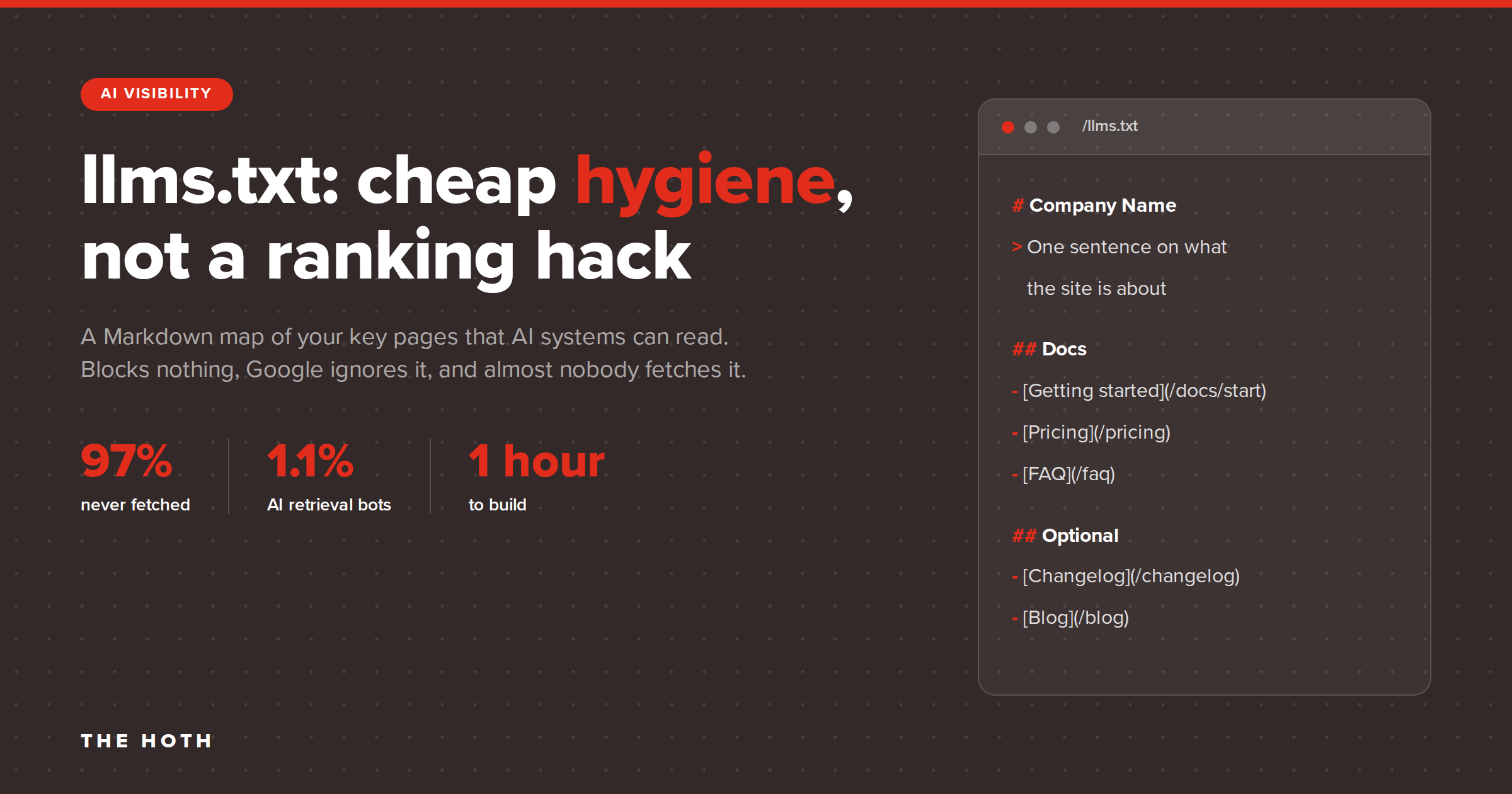

llms.txt is a plain Markdown file at the root of your domain that gives AI systems a curated map of your most important pages. It does not block or control anything, Google Search ignores it, and server log data shows most AI crawlers never request it. It costs about an hour to create and carries almost no risk, so it belongs at the bottom of your AI visibility checklist, not the top.
If you have looked at an AI visibility checklist in the last year, you have seen llms.txt on it. Website builders now generate the file automatically. Audit tools flag you for not having one. Agencies pitch it as the robots.txt of the AI era.
Here is the uncomfortable part: the companies that run the AI crawlers have not committed to reading it, and the largest log study to date found that 97% of published llms.txt files got zero requests in a month. Not zero AI requests. Zero requests of any kind.
That does not make llms.txt worthless. It makes it a small, cheap piece of hygiene that gets sold as a ranking hack. This guide gives you the honest version: what the spec says, what the crawler data shows, how llms.txt relates to robots.txt and AI crawler blocking, and a template you can adapt in an afternoon. By the end you will know whether your site needs one, and what to spend your time on instead if the answer is no.
What is llms.txt?
llms.txt is a proposed convention, introduced in September 2024, for a Markdown file at yourdomain.com/llms.txt that summarizes what a site is about and links to its most useful content. The only required element is an H1 with the site name. It is designed to help language models find the right pages at the moment a user asks a question, not to govern crawling or training.
The idea came from Jeremy Howard, co-founder of Answer.AI and fast.ai. His argument was practical. AI models work with limited context windows, and turning a full HTML page (navigation, ads, scripts, footers) into clean text is messy. A single, curated Markdown file gives a model a shortcut to the content that matters.
The llms.txt specification is deliberately minimal. A valid file contains, in order:
- An H1 with the name of the site or project. This is the only required part.
- A blockquote with a short summary that gives context for everything below it.
- Optional paragraphs or lists with more detail about the site and how to interpret the links.
- One or more H2 sections, each containing a Markdown list of links, optionally followed by a colon and a short note about each link.
- An Optional section (literally titled “Optional”) for secondary links that a model can skip when it needs a shorter context.
The spec also suggests publishing a clean Markdown copy of important pages at the same URL with .md appended. That is a separate tactic with its own tradeoffs, and it is not what most people mean by “add an llms.txt file.”
One more clarification: the spec does not define llms-full.txt. That name came from the community and from generator tools. For a business website, the plain llms.txt is the only file worth thinking about.
How is llms.txt different from robots.txt and your sitemap?
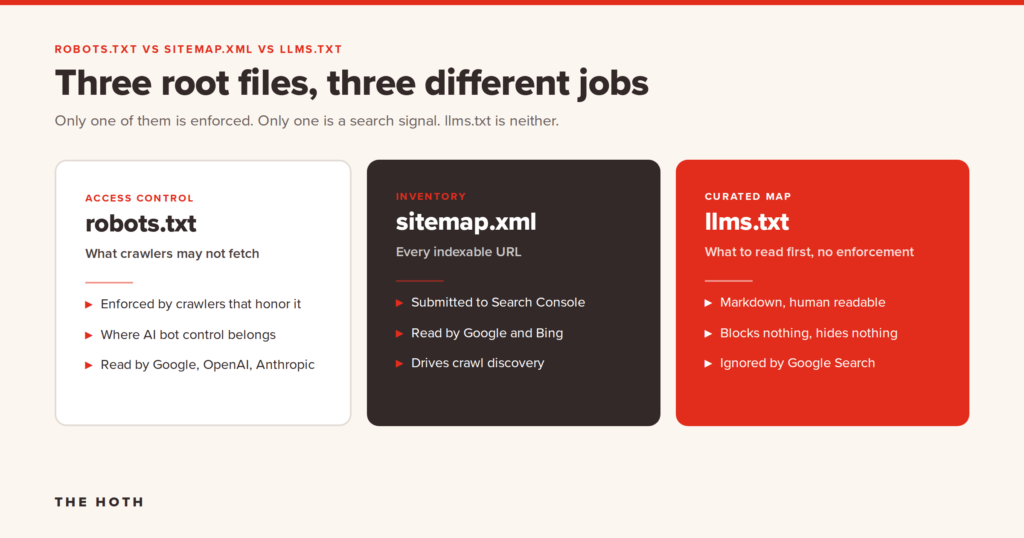
robots.txt tells crawlers what they may not access. A sitemap lists every indexable URL on your site. llms.txt recommends a short list of pages an AI system should read first. It grants nothing, blocks nothing, and is not a directive. If you want to control which AI bots can crawl your site, robots.txt is still the tool.
These three files get lumped together because they all live at the root of a domain. They do very different jobs.
robots.txt is an access control file. It has been around since 1994, and every major crawler, including the AI ones, documents how it handles the file. When you want to keep GPTBot out of your site, or let OAI-SearchBot in, this is where you do it. More on that below.
sitemap.xml is an inventory. It lists every URL you want indexed, with no editorial judgment about which ones matter. Search engines use it for discovery. It is far too large and too undifferentiated for a model to use as a starting point.
llms.txt is a curated reading list. It can point to a few dozen pages, it can include links to resources off your own domain, and it can add a sentence of context to each link. It is written in the same format an AI model already reads well. The tradeoff is that nothing forces any system to open it.
Which AI crawlers use llms.txt?
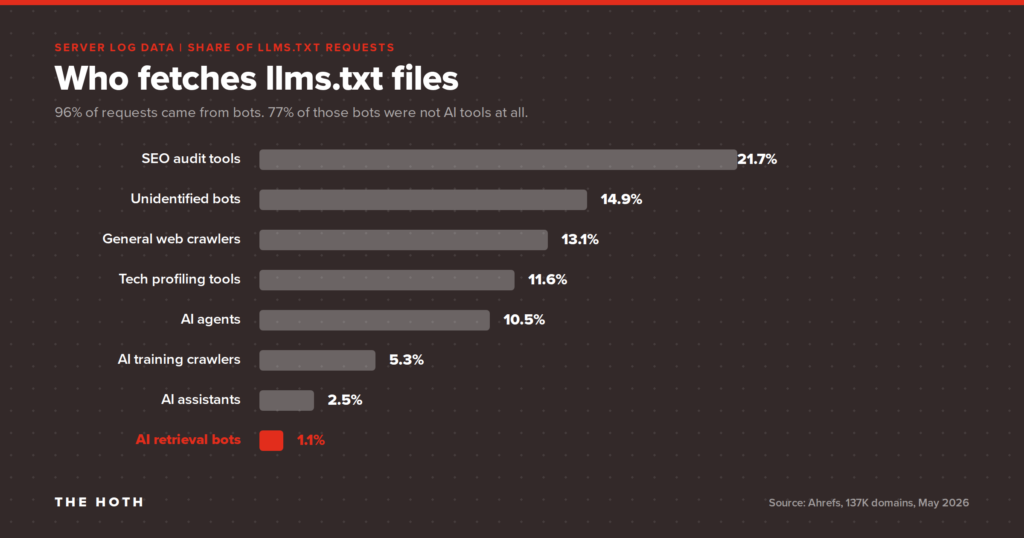
Almost none of the ones you care about. A June 2026 Ahrefs study of 137,210 domains found that 97% of published llms.txt files received zero requests in a month. Of the requests that did happen, AI search retrieval bots (the ones that fetch pages to answer live queries in ChatGPT and Perplexity) made up 1.1%. The most consistent AI readers were coding agents, not search bots.
For most of 2025 the debate ran on anecdotes. The Ahrefs llms.txt study changed that by looking at real server logs across every domain in its web analytics product.
- 28% of domains in the sample had published a valid llms.txt file. Ahrefs notes its customers skew technical, so this is a ceiling for the web at large.
- 97% of those files got no requests at all in May 2026. No bots, no humans, nothing.
- Of the 3% that were fetched, 96% of requests came from bots, and 77% of those bots were not AI tools. The largest single category was SEO audit tools, at 21.7% of requests.
- All AI bots combined accounted for 19.5% of requests. Within that group, AI agents and agentic infrastructure led at 10.5%, training crawlers followed at 5.3% (GPTBot alone was 4.51%), assistants took 2.5%, and retrieval bots came last at 1.1%.
- Zero AI bot requests hit llms.txt paths that returned a 404. AI systems are not probing for the file. They fetch it when something points them to it.
That last finding matters more than the percentages. If crawlers wanted this file, you would expect them to check for it the way they check for robots.txt. They do not. Publishing an llms.txt does not put you on anyone’s radar.
The one audience that shows real interest is coding agents. Claude-Code out-fetched every retrieval bot, every assistant, and every training crawler in the Ahrefs data. That lines up with the file’s origin story: it was built for developer documentation, and developer tools are the ones using it.
What Google says about llms.txt
Google has been unusually direct. Its guide to optimizing for generative AI features includes a section titled “Mythbusting generative AI search,” and llms.txt is the first item on the list of things you can ignore. Google Search does not use the file. It may crawl and index it like any other text file, but that does not mean it treats it specially. Creating one will neither help nor hurt your visibility in AI Overviews or AI Mode.
Then, in the same month, a different Google team shipped an llms.txt check inside Lighthouse’s experimental agentic browsing audits. The audit only flags a server error when fetching the file. A missing file is marked not applicable, because, in Chrome’s own words, providing it is optional at the moment. The documentation explains the reasoning: without the file, an agent may spend more time crawling to understand a site’s structure.
The two positions are not a contradiction once you separate the audiences. Google Search has an index and does not need a map. A browser agent arriving cold at a site might. Google’s John Mueller described the file as a temporary crutch for AI coding tools parsing documentation, not something most business sites need to worry about.
What OpenAI, Anthropic, and Perplexity say
The short version: nothing. OpenAI’s crawler documentation describes GPTBot, OAI-SearchBot, ChatGPT-User, and OAI-AdsBot, explains how each treats robots.txt, and publishes IP ranges for verification. It does not mention llms.txt as a signal any of those bots consume. OpenAI’s own developer docs site publishes an llms.txt, which tells you the format has a real use for documentation, but that is a different claim from “our search bot reads yours.”
As of this writing, no major AI provider has published a statement that its production retrieval systems act on llms.txt. Fetching is not the same as using.
Does llms.txt help you get cited in AI search?
There is no evidence that it does today. AI citations come from the same signals that drive organic rankings: a crawlable, technically sound site, authoritative links and brand mentions, and content that answers specific questions clearly. llms.txt does not change any of those inputs.
Google’s guide says its generative AI features pull from the same index and ranking systems as regular Search, using retrieval-augmented generation and query fan-out. A page has to be indexed and eligible for a snippet before it can appear in an AI Overview. That is a crawlability and quality problem, not a file format problem.
The same pattern shows up in campaign data. When The HOTH tracked its own generative AI traffic over 12 months, from January 2025 to February 2026, AI-referred sessions grew 354%, with ChatGPT referrals up 502%. There was no llms.txt trick behind it. The inputs were roughly $5,000 a month in digital PR link building, ongoing content on topics where AI tools recommend solutions, and consistent brand presence on social channels. Those AI-referred visitors converted at 22.79%, against 2.45% for standard organic search, a 9.3x difference.
Technical hygiene matters just as much, and here the evidence is even clearer. One HOTH ecommerce client, an Australian fine jewelry retailer, watched organic traffic drop from 655 monthly visitors to 32 after a site redesign introduced crawl barriers, index bloat, and a broken sitemap. A technical SEO audit fixed the canonical tags, pagination, robots.txt directives, and duplicate metadata. Traffic recovered to 592 monthly visitors, domain rating climbed from 1 to 20, and a site that had been invisible to AI tools picked up 54 AI citations, including 27 from ChatGPT and 24 from Perplexity. The AI wins came from making the site crawlable, not from adding a new file.
How do you control AI crawlers? (Hint: not with llms.txt)
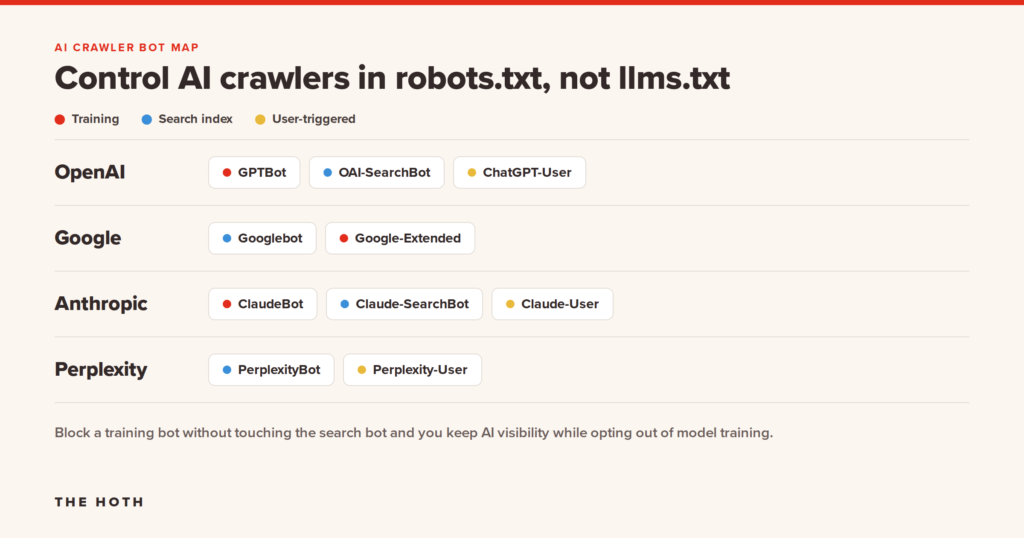
You control AI crawlers in robots.txt, by naming each bot’s user agent token and allowing or disallowing paths. The important distinction is between training crawlers, search retrieval bots, and user-triggered fetchers. Blocking the wrong one removes you from AI search answers without protecting anything.
Because llms.txt lives next to robots.txt, a lot of site owners assume it is a way to manage AI access. It is not. Whether your goal is keeping content out of training data or making sure your pages can be cited in ChatGPT search, the work happens in robots.txt.
Each major AI company runs more than one bot, and they do different jobs. Treating them as a single “AI bot” is the most common mistake.
OpenAI
- GPTBot crawls content that may be used to train foundation models. Disallowing it is the training opt-out.
- OAI-SearchBot surfaces sites in ChatGPT’s search features. OpenAI’s documentation states that sites which block it will not be shown in ChatGPT search answers. If you want citations, allow it.
- ChatGPT-User fetches a page when a user asks ChatGPT to visit it. Because the action is user-initiated, OpenAI says robots.txt rules may not apply.
Each of these is controlled independently. You can disallow GPTBot and allow OAI-SearchBot in the same file. OpenAI notes it can take around 24 hours for search behavior to reflect a robots.txt change.
Google does not run a separate Gemini crawler. Regular Googlebot fetches the content, and Google-Extended is a robots.txt token, not a bot with its own user agent string. Disallowing Google-Extended tells Google not to use your content for training future Gemini models or for grounding in Gemini apps. It has no effect on Google Search rankings or on whether you appear in AI Overviews. Those are governed by Googlebot and the standard technical requirements.
Anthropic and Perplexity
Anthropic follows the same three-way split: ClaudeBot for training, Claude-SearchBot for search retrieval, and Claude-User for user-triggered fetches. Perplexity runs PerplexityBot for indexing and Perplexity-User for live requests. In every case, the retrieval and user-triggered bots are the ones that turn into citations and referral traffic.
A sensible default for most businesses looks like this:
User-agent: OAI-SearchBot
Allow: /
User-agent: ChatGPT-User
Allow: /
User-agent: Claude-SearchBot
Allow: /
User-agent: PerplexityBot
Allow: /
User-agent: GPTBot
Disallow: /
User-agent: Google-Extended
Disallow: /
That configuration keeps you eligible for AI search citations while opting out of training. Whether you want to opt out of training is a business decision. Many marketing sites choose to allow it, on the theory that models which know your brand are more likely to recommend it. Only the training crawlers are affected either way.
Two cautions. First, check your CDN and firewall rules, because a WAF that returns 429 or 403 to bots will block a crawler your robots.txt allows. Second, user agent strings can be spoofed, so if you need certainty, verify requests against the published IP ranges from OpenAI and Google.
How do you write an llms.txt file?
Create a plain text file named llms.txt, write it in Markdown, start with an H1 naming your business, add a one-paragraph blockquote summary, then group your most important pages under H2 headings with a short note on each link. Upload it to your site’s root so it resolves at yourdomain.com/llms.txt, and link to it from your HTML so agents can find it.
If you have decided to add one, here is how to do it well in under an hour.
Step 1: Decide what belongs in it
This is a curated list, not a sitemap. Pick 15 to 40 pages that answer what a prospect would ask an AI assistant about your business: what you do, who you serve, what it costs, where you operate, and proof that you deliver. Service pages, pricing, case studies, location pages, and your best guides belong. Blog archives, tag pages, and legal boilerplate do not.
Step 2: Write the summary
The blockquote under the H1 is the most important line in the file. Write it the way you would explain the business to a smart stranger in two sentences: what you do, for whom, and what makes you different. Avoid slogans. A model reading this line should be able to answer “what is this company?” without opening another page.
Step 3: Group the links
Use H2 headings that match how people think about your business, not your site’s navigation. “Services,” “Pricing,” “Case Studies,” and “Guides” work for most companies. Put a colon and a plain-language note after each link. The note is what a model uses to decide whether to open the page.
Step 4: Add an Optional section
Anything a model could skip when it needs a shorter answer goes under an H2 titled “Optional.” This is the spec’s one special heading, so use the exact word.
A template for a service business
# Example Plumbing Co
> Example Plumbing Co is a licensed residential and commercial plumbing
> company serving the Denver metro area since 2009. We offer 24/7
> emergency service, water heater replacement, and repiping, with
> upfront pricing and a 2-year workmanship warranty.
Service area: Denver, Aurora, Lakewood, Littleton, and Arvada, CO.

## Services

- [Emergency Plumbing](https://example.com/emergency/): 24/7 dispatch, average 45 minute response.
- [Water Heater Repair and Replacement](https://example.com/water-heaters/): Tank and tankless, all major brands.
- [Repiping](https://example.com/repiping/): Whole-home copper and PEX repiping with fixed quotes.

## Pricing

- [Pricing Guide](https://example.com/pricing/): Flat-rate pricing for common repairs, published and updated monthly.

## Proof

- [Reviews](https://example.com/reviews/): 1,200+ verified customer reviews, 4.9 average.
- [Licenses and Insurance](https://example.com/about/licensing/): State license number and insurance details.

## Guides

- [How to Shut Off Your Water Main](https://example.com/guides/water-main/): Step-by-step with photos.
- [Tank vs Tankless Water Heaters](https://example.com/guides/tank-vs-tankless/): Cost, lifespan, and fit by household size.

## Optional

- [Blog](https://example.com/blog/): Monthly maintenance tips and local plumbing news.
- [Careers](https://example.com/careers/): Open technician and dispatcher roles.
Step 5: Publish, link, and monitor
Upload the file to your web root so it returns a 200 status at yourdomain.com/llms.txt, with a text/plain or text/markdown content type. Then link to it from somewhere in your HTML, such as your footer or your sitemap. The Ahrefs data is clear that agents fetch llms.txt when directed to it, not speculatively, so an unlinked file is unlikely to be found.
Should you add llms.txt to your site?
Yes, if you can do it in an hour and keep it accurate. It will not improve rankings or AI citations, but the cost is low, some agents and coding tools do read it, and adoption may grow. Treat it like code: keep it in version control, restrict who can edit it, link only to pages you own, and review anything a plugin generates for you.
The honest decision framework has three questions.
Do agents interact with your site? If you publish documentation, an API, or structured product data that developers pull into AI tools, llms.txt has a demonstrated audience and you should ship one. If you run a local service business or a marketing site, the audience is close to zero today.
Can you keep it accurate? A stale llms.txt is worse than none. Every agent that reads it trusts it. If your pricing page moves or a service gets discontinued, the file has to change with it. If no one on your team will own that, skip it.
Are you treating it as a substitute for real work? This is the one that matters. Ahrefs found that the single largest group of bots reading llms.txt files were SEO audit tools, many of which penalize you for not having the file. That loop can make llms.txt feel important when it is not. If adding the file means the technical audit, the link building, or the content refresh slides a month, you have made the wrong trade.
There is also a security angle. One of the most active research crawlers in the Ahrefs data identified itself as a prompt injection survey. Agents are built to trust llms.txt, so a compromised file misleads every system that reads it. Keep the content to plain links and descriptions, with nothing that reads like an instruction, and audit anything your CMS auto-generated.
Where does llms.txt fit in an AI visibility strategy?
At the end. The work that gets a site cited in ChatGPT, Perplexity, and AI Overviews is crawlability, authority, and clear answers to real questions. llms.txt is a finishing touch on a site that already has those in place.
Start with the fundamentals in order: confirm the AI search bots can reach your pages, fix the technical issues that keep pages out of the index, earn the links and mentions that models associate with authority, and structure your content so a direct answer sits under each heading.
That is the sequence behind AI Discover, The HOTH’s AI visibility service. It starts with an audit of how your brand currently appears across ChatGPT, Perplexity, Gemini, and Google’s AI features, then builds the technical, content, and authority work that moves those results. The jewelry client above and The HOTH’s own 354% AI traffic growth both came from that kind of program, not from a text file.
Frequently asked questions about llms.txt
Is llms.txt an official standard?
No. It is a community proposal published by Answer.AI with no backing from a standards body and no enforcement mechanism. AI companies can adopt it or ignore it on their own terms, and so far none of the major providers has documented support for it in their search or retrieval systems.
Does llms.txt block AI crawlers?
No. It does the opposite of robots.txt. llms.txt suggests which pages an AI system should read first, and carries no restrictive power. To limit AI access, use robots.txt with the specific bot user agent tokens, backed by your terms of service and, if needed, firewall rules.
Does Google use llms.txt?
No. Google’s official guide to generative AI features lists llms.txt among the things you do not need, and states that creating one will neither help nor hurt your visibility in Google Search. Chrome’s Lighthouse tool does include an optional llms.txt audit aimed at agentic browsing, which is a separate use case from search.
Should I create a Markdown copy of every page?
Usually not. The spec suggests it, but publishing .md mirrors of every page at scale introduces duplicate content if those files are indexable, and it doubles the maintenance burden. If you do it at all, limit it to documentation and keep the mirrors out of the index.
How do I check whether anything is reading my llms.txt?
Filter your server logs or bot analytics for requests to /llms.txt and look at the user agents. Requests from OAI-SearchBot, PerplexityBot, or Claude-SearchBot mean a retrieval system fetched it. Requests from audit tools mean someone is checking whether you have one. A 404 on that path means bots are asking for a file you have not published, which is the clearest signal that it might be worth adding.
The bottom line on llms.txt
llms.txt is a reasonable idea that got oversold. The spec is simple, the file is cheap, and a small set of agents and coding tools do read it. But Google ignores it, the AI search bots barely fetch it, and no provider has committed to acting on it. If you add one, do it in an hour, keep it accurate, and move on.
The sites winning AI citations right now are the ones that fixed crawlability, earned authority, and answered questions clearly. If you would like to see where your site stands on those fundamentals, book a call with our team and we will walk through your AI visibility together.
Leave a comment