

Want to know how to do SEO for a business with multiple locations? This post has you covered!
With just a little time and effort, you can start cashing in on the customers in your area who are ready to purchase right now.
Did you know that a whopping 46% of all searches on Google are local?
Yep, you read that right. Nearly half of ALL Google searches revolve around local businesses.
In other words, if you don’t already have local SEO setup for the multiple locations of your business, you are missing out on massive traffic and sales.
But… what if I told you that with a few simple changes to your website, you could be easily and organically attracting more targeted traffic to your store?
Wouldn’t it be nice if your local store was the one showing up for that person who is ready to buy?
Whether it’s a client’s business or yours, this step-by-step guide will show you how to dominate local search for a multiple-location business.
Let’s get started!
What is Multiple-Location SEO?
If you have multiple locations or service multiple areas, you can set your website up in a certain way to maximize your search traffic and user experience.
You’ll want to follow this strategy if any of the following apply:
- You have multiple physical stores or locations
- You serve multiple areas (even if you don’t have a physical store)
- You are a directory that aggregates local businesses
Whether you have 2 locations or 2000, it’s crucial to present Google and the other search engines with the right information.
Doing so allows the search engines to distinguish between the different locations, and present the right one to people who search for it.
Are you ready to learn how to do SEO for a multiple-location business?
Let’s get into it!
1. Build Out Pages For Each Location
One of the biggest problems we see is simply not building out separate pages for each location.
Often websites will try to rank their homepage for multiple locations or put all locations on a single page.
These are not optimal because each page of your website should be about 1 thing. And when you build out dedicated pages, you have way more chances to rank!
You might be thinking, “Isn’t this really necessary? I’m probably going to have lots of pages that say almost the same thing!”
The answer is a resounding YES. You need location-specific pages. Do a search in Google for the term you want to rank for and you’re almost guaranteed to see location-specific pages ranking.
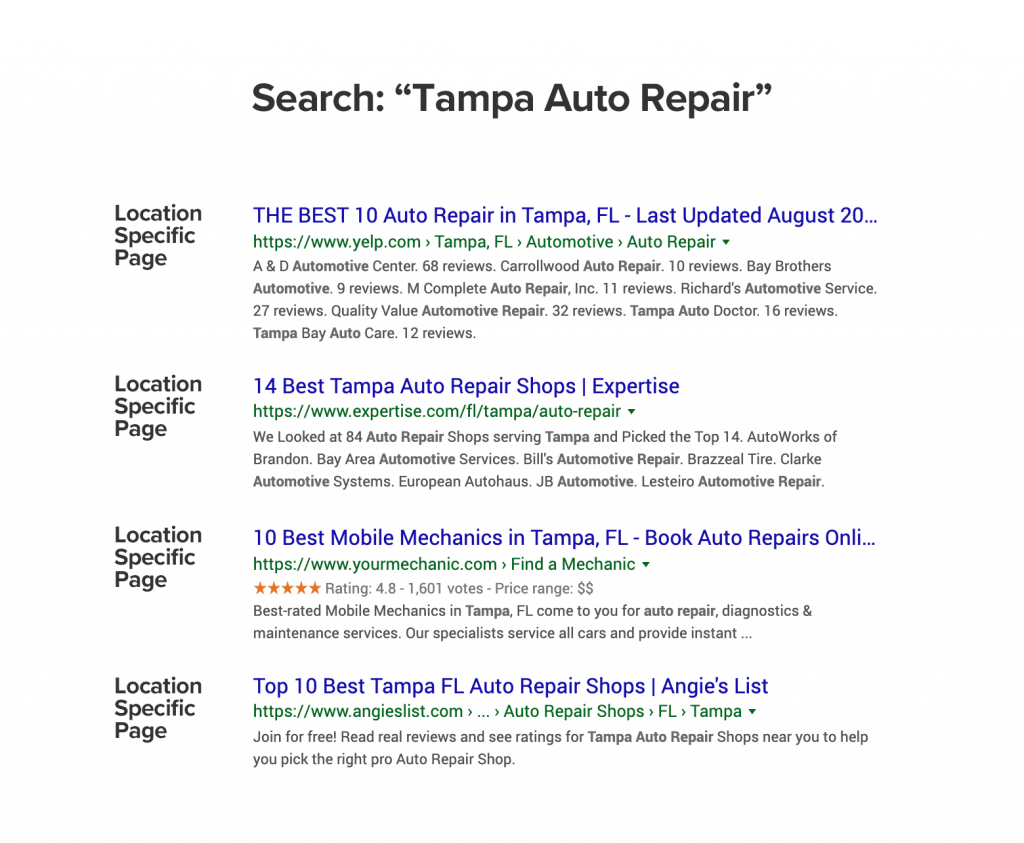
In the above example, you can see that each of these pages that are ranking are specifically about auto repair in 1 location.
The easy way to fix this is to simply build out pages for each location that you serve.
Creating a logical URL structure
By creating a logical site structure with your URLs, your site will be very organized, easy to navigate for users, and easy to understand for search engines. Plus, you can maximize your chances of ranking!
An example of one way to do this for a business with many locations across multiple states could be:
yourbiz.com/locations/ for a list of all the locations
yourbiz.com/locations/florida/ for a list of all the locations in a particular state
yourbiz.com/locations/florida/tampa/ for a list of locations in a city
yourbiz.com/locations/florida/tampa/location-name1/ for store #1
yourbiz.com/locations/florida/tampa/location-name2/ for store #2 in the same city
Be sure to make the URL geo-specific whenever it makes sense.
If store #1 is located in a strip mall called Grand Plaza Mall, or at the intersection of 5th St. and Elm St. then the URL could be:
yourbiz.com/locations/florida/tampa/Grand-Plaza-Mall
Alternatively, you could make it a page for the service that you offer
yourbiz.com/locations/state/city/widget-repair
Whatever way you decide to structure your URL’s, keep their organization tidy by sticking to one system that makes sense.
You want to make sure that your individual pages can be indexed by Google and other search engines.
2. Optimize Each Location Page For SEO
After you’ve created the pages, you need to optimize them so Google understands what each page is about.
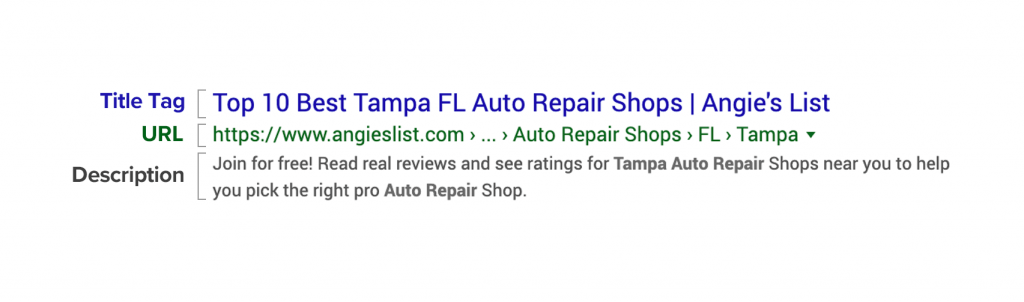
You’ll first want to include your keywords in the title tag and meta description.
This is the piece of code on every page that suggests what Google should display in the search results.
Tip: If you’re using WordPress for your website, you can use a simple plugin like Yoast to modify your title tags.
In the example above, you can see the title tag includes both the description of the service as well as the location.
The meta description also includes the location and the service and entices the user to click on the result.
3. Optimize the Content for Each Location
After you’ve created the pages and optimized the title tags & descriptions, you’ll want to add localized content to the page!
Many location pages make a big mistake by not adding much content, so make sure you add everything that a user would want to know.
What content should you add to these pages?
Here are some ideas to consider:
- Service Descriptions: Describe the services that you offer. If you offer a variety of different services, consider creating a new page for each.
- Common Questions: Add commonly asked questions and answers about your services.
- Photos: Add photos of the location or your work in the area. .
- Reviews: Reviews are crucial to capturing customers with a strong intent to make a purchase. Searches for “[your brand] [city] reviews” are sure to occur. These people are seriously considering your business, they just want to hear what other customers have to say about it.
- Directions: Add instructions for getting to your business from each cardinal direction (starting with the highway exit). Embed a map with your location pinned as well.
If you’d like some help building out your content, be sure to check out our copywriting product, HOTH Web Copy.
4. Create A Google My Business Profile for Each Location
Google My Business is Google’s service for helping control how your business appears on Google & Maps.
By claiming and optimizing your profiles for each location, you can take control of your presence!
We put together a huge guide on everything you need to know about Google My Business here.
The good thing is if you have multiple locations, it’s easy to keep everything organized. You can use the same account to manage all the locations.
If you have more than a few locations, you can even use the bulk upload spreadsheet and import them into GMB simultaneously using the import tool.
Triple-check your work before uploading. It’s easier if you get it loaded in right the first time!
5. Build Local Business Listings For Each Location
Getting listed in local directories for each location is an important part of getting maximum visibility with SEO.
You’ll want to make sure you’re listed on all the popular sites for your niche, and that your information is accurate.
The combination of your name, address, and phone number is referred to as a NAP, or NAP citation.
When Google sees the presence of your NAP combination on multiple websites, that is a positive signal for SEO.
On the flip side, Google often pulls inaccurate or outdated NAP’s from aggregator sites, resulting in what they see as a discrepancy between their information about your business and what’s on your website.
You’re better off keeping Google happy by managing your citations. Citation inconsistencies are the top issue affecting local SEO.
Our Ultimate Guide to Local SEO has an in-depth section on building NAP citations that you’ll want to check out for a full tutorial.
6. Get Reviews for Each Location
Did you know that 85% of consumers trust online reviews as much as a recommendation from a friend or acquaintance, and 49% of consumers look for at least a four-star rating before choosing a business?
Reviews are now featured prominently in many search results, especially search results that trigger map pack listings.
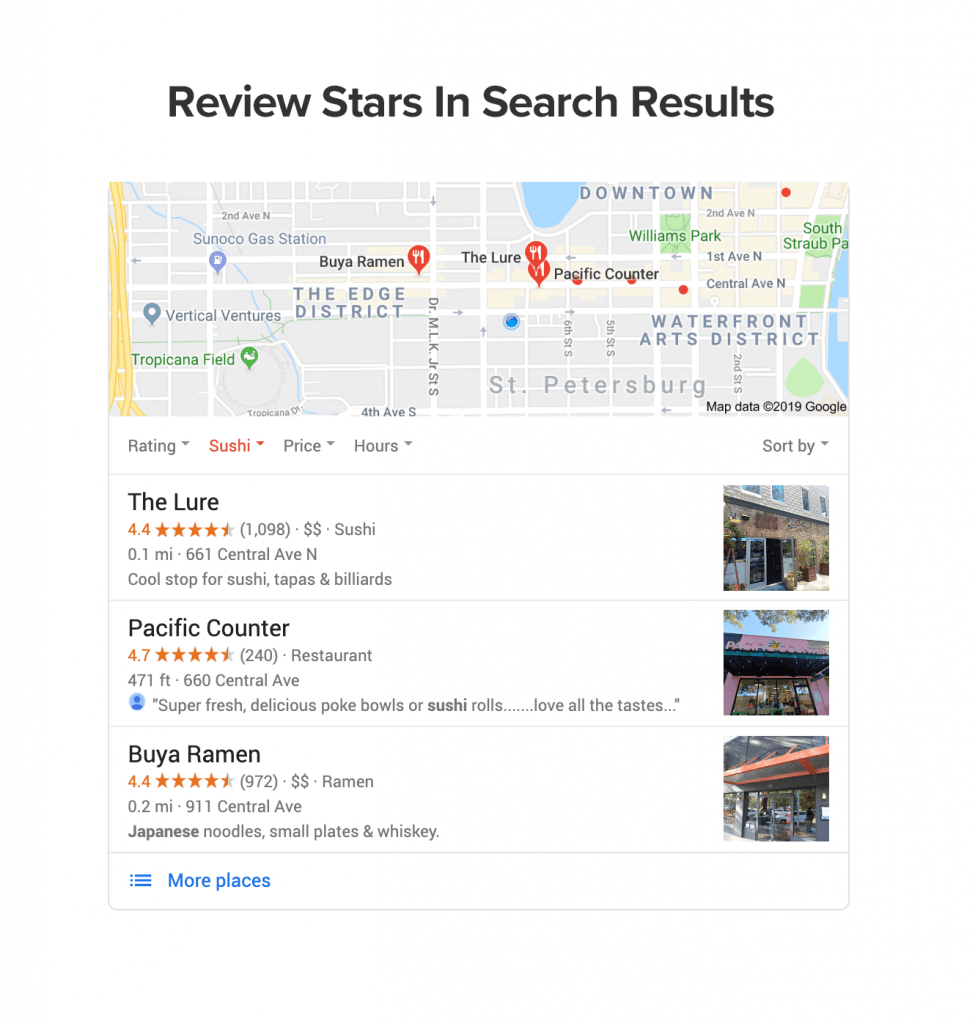
We wrote a huge post on how to get more reviews here.
Additionally, if you want some help with this, you might be interested in our review management software HOTH Stars.
Conclusion
By following this strategy for multi-location SEO, you’ll be able to rank for more terms and get more customers!
Creating unique content for each location and service page can be time-consuming, but it’s worth it if you’re serious about investing in your SEO. If you’d like to speed up the process, check out our done-for-you copywriting service, HOTH Web Copy.
We offer digital marketing solutions for different industries. Read about how we’ve helped law firms, dental offices, contractors, and more.
Do you have any questions about doing local SEO for multiple locations? Have a story or strategy to share? Let us know in the comments below!
Leave a comment