

Technical SEO is one of those things that nobody thinks about until something breaks.
And when it breaks, it breaks everything.
Rankings disappear. Pages fall out of the index. Traffic craters overnight. You’re left staring at Google Search Console wondering what happened, and the answer is almost always something unglamorous hiding in your site’s backend.
Here’s the reality. You can have the best content on the internet, but if search engines can’t crawl it, index it, or render it properly, none of it matters.
That’s what technical SEO is. It’s the foundation underneath everything else you’re doing. Your content strategy, your link building, your on-page optimization – all of it depends on a clean technical setup.
And in 2026, the bar is higher than it used to be.
Google’s crawl systems are more sophisticated. Core Web Vitals still matter (a lot). And now you’ve got AI search engines like ChatGPT, Perplexity, and Google’s AI Overviews crawling your site too. If your technical foundation has gaps, you’re invisible in two ecosystems instead of one.
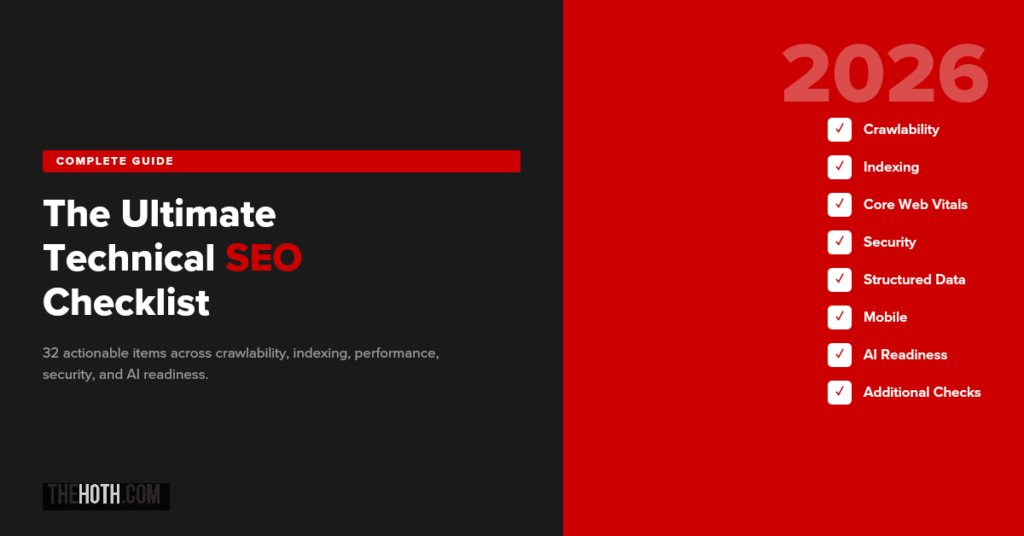
So whether you’re running a quick audit or doing a full technical overhaul, this checklist covers everything you need. Crawlability, indexing, site speed, security, structured data, and AI readiness. All in one place.
Let’s get into it.
What Is Technical SEO (And Why Should You Care)?
Technical SEO refers to all the behind-the-scenes optimizations that help search engines crawl, index, render, and understand your website.
It’s not about keywords or content quality. It’s about whether search engines can even access your content in the first place.
Think of it this way.
Your website is a building. Your content is everything inside it. Technical SEO is the plumbing, the electrical, the foundation. If any of that fails, it doesn’t matter how beautiful the interior is. Nobody can use it.
Why does this deserve its own checklist?
Because 55% of SEOs agree that technical SEO doesn’t get enough attention relative to its impact. And the consequences of ignoring it are brutal.
We’ve seen it firsthand. One of our clients, an Australian e-commerce brand, lost 95% of their organic traffic overnight after a site redesign introduced technical issues. Their average monthly visitors dropped from 655 to 32. The culprit? Crawlability barriers, index bloat, and broken sitemaps. Once our team ran a technical SEO audit and fixed the issues, traffic recovered to over 590 visitors per month, and they picked up 54 AI citations as a bonus.
That’s technical SEO in a nutshell. It’s invisible when it’s working. Catastrophic when it’s not.
Part 1: Crawlability Checklist
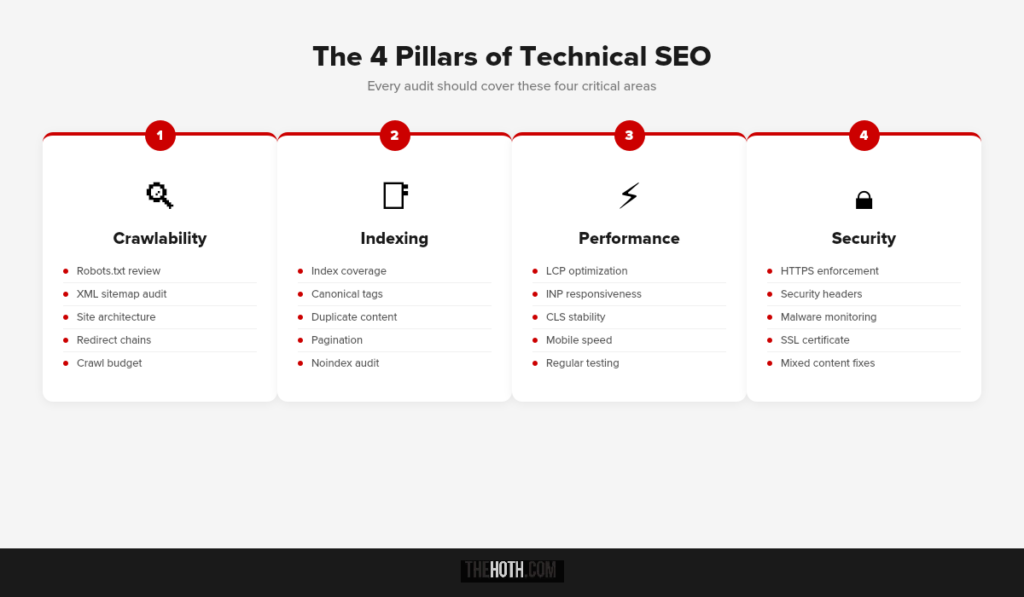
Before Google (or any search engine) can rank your content, it has to find it. That’s what crawlability is about. Making sure search bots can discover and access every page that matters.
Here’s what to check.
1. Review Your Robots.txt File
Your robots.txt file tells search engines what they can and can’t crawl on your site.
The problem? It’s really easy to accidentally block important pages. A single misplaced directive can hide your entire blog, your product pages, or your key landing pages from Google.
What to do:
Go to yoursite.com/robots.txt and review it. Make sure you’re not blocking any critical directories. Common mistakes include blocking /wp-admin/ in a way that prevents CSS/JS from loading, or disallowing entire subdirectories that contain rankable content.
If you’re not sure what’s blocked, Google Search Console has a robots.txt tester that lets you check specific URLs against your directives.
2. Submit and Audit Your XML Sitemap
Your XML sitemap is Google’s roadmap to your site. It tells crawlers exactly which pages exist and when they were last updated.
Every page in your sitemap should: Return a 200 status code (not 301, 404, or 410). Be the canonical version of that URL. Actually be a page you want indexed.
If your sitemap includes broken URLs, redirect chains, or noindexed pages, you’re wasting your crawl budget on pages that will never rank.
Submit your sitemap through Google Search Console under Sitemaps in the left sidebar. Then check back regularly for errors. Tools like Screaming Frog can also audit your sitemap automatically and flag any inconsistencies.
3. Optimize Your Site Architecture
Flat site architecture matters more than most people realize.
The rule of thumb: every important page should be reachable within 3 clicks of your homepage. The further a page is from your homepage, the less crawl priority it gets. And the less likely it is to rank.
Group related pages together. Use logical category structures. Make sure internal links flow naturally between related content.
If you’ve got orphan pages (pages with zero internal links pointing to them), they’re essentially invisible to both users and search engines. Fix that.
4. Fix Redirect Chains and Broken Links
Redirect chains happen when URL A redirects to URL B, which redirects to URL C. Every hop in the chain wastes crawl budget and dilutes link equity.
Broken links are even worse. They send users and bots to dead ends (404 pages), which wastes crawl resources and creates a terrible user experience.
Run a crawl with Screaming Frog or Ahrefs to identify redirect chains and broken links. Then fix them. Either update the links to point directly to the final destination, or set up proper 301 redirects where needed.
5. Manage Your Crawl Budget
Crawl budget is the maximum number of pages Google will crawl on your site during a given session. For small sites, this usually isn’t an issue. For large sites (e-commerce, publishers, SaaS), it matters a lot.
Ways to protect your crawl budget:
Use noindex tags on pages you don’t want ranked (login pages, thank you pages, admin pages, filtered product pages). Canonicalize duplicate content instead of letting Google sort it out. Clean up URL parameters that generate thousands of near-identical pages. Remove or redirect outdated content that serves no purpose.
The less junk Google has to crawl through, the more time it spends on pages that actually matter.
Part 2: Indexing Checklist
Crawlability gets Google to your pages. Indexing determines whether those pages actually make it into search results.
Big difference.
A page can be crawled but never indexed. That means Google saw it, decided it wasn’t worth storing, and moved on. If that’s happening to your important pages, you’ve got a problem.
6. Check Index Coverage in Google Search Console
Google Search Console’s Pages report (formerly Index Coverage) shows you exactly which pages are indexed, which are excluded, and why.
Look for:
Pages stuck in “Discovered, currently not indexed” (Google found them but hasn’t crawled them yet). Pages marked “Crawled, currently not indexed” (Google crawled them and decided not to index them). Pages excluded by noindex tags you didn’t intend to set. Duplicate pages without canonical tags.
If important pages aren’t getting indexed, that’s usually a signal of thin content, crawlability issues, or a lack of internal links pointing to those pages.
7. Use Canonical Tags Correctly
Canonical tags tell Google which version of a page is the “official” one. This is critical for avoiding duplicate content issues, especially on e-commerce sites with product variations or sites with URL parameters.
Common canonical mistakes:
Setting the canonical to a different page entirely (accidentally). Having conflicting canonicals across HTTP and HTTPS versions. Pointing canonicals to pages that are noindexed (which creates a logical contradiction Google has to sort out).
Every page should have a self-referencing canonical tag unless you intentionally want to consolidate page authority elsewhere.
8. Eliminate Duplicate Content
Duplicate content confuses search engines. When multiple pages have the same (or very similar) content, Google has to guess which one to rank. Sometimes it guesses wrong.
The most common sources of duplication:
WWW vs. non-WWW versions of your site (should resolve to one). HTTP vs. HTTPS versions (should all redirect to HTTPS). URL parameters creating multiple versions of the same page. Product pages with slight variations (color, size) that duplicate the body text.
Canonical tags, 301 redirects, and noindex directives are your three tools for cleaning this up.
9. Handle Pagination Properly
If your site uses pagination (page 1, page 2, etc.), make sure Google can actually follow the chain. Some sites use “load more” buttons or infinite scroll powered by JavaScript, and Googlebot can’t always interact with those elements.
Best practice: Use standard HTML pagination links that crawlers can follow. If you’re using JavaScript-based pagination, make sure the paginated content is also accessible through static URLs.
10. Audit Your Noindex Tags
Noindex tags are powerful. They tell Google “don’t put this page in your search results.” But they’re also easy to misapply.
Run a crawl and check every page that has a noindex tag. Make sure they’re only on pages you intentionally want excluded, like staging pages, internal search results, or admin screens.
One of the most common technical SEO mistakes we see is a developer leaving noindex tags on a staging environment, then pushing that code to production. Entire sites have disappeared from Google because of this.
Part 3: Core Web Vitals and Site Speed
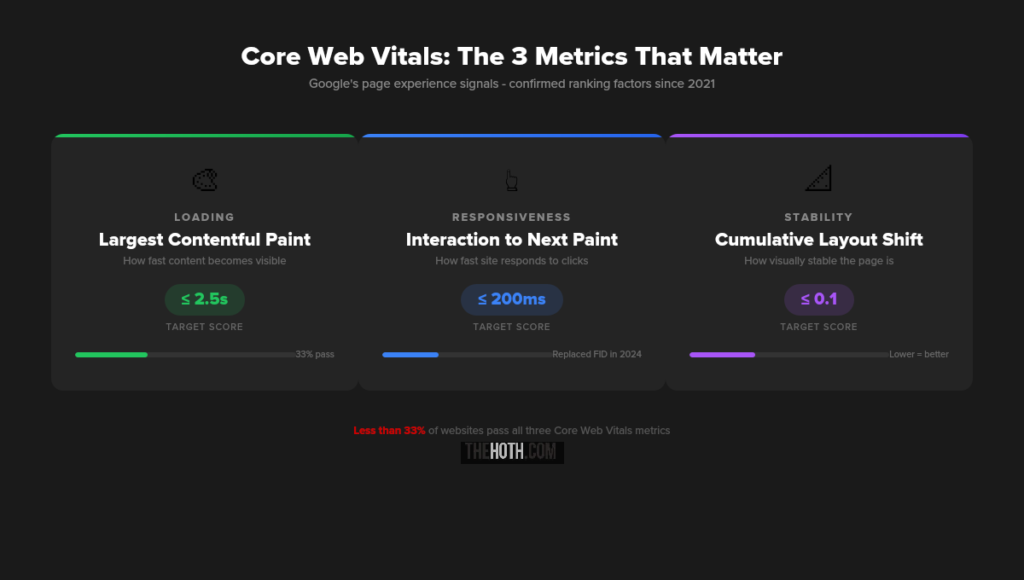
Google has made it clear that page experience matters. Core Web Vitals are the specific metrics they use to measure it, and they’re a confirmed ranking factor.
Less than 33% of websites actually pass Google’s Core Web Vitals assessment. That means the majority of sites on the internet have a performance problem. If you fix yours, you immediately have an edge.
11. Optimize Largest Contentful Paint (LCP)
Target: 2.5 seconds or faster.
LCP measures how long it takes for the largest visible element on your page to fully render. That’s usually a hero image, a large text block, or a video.
How to improve it:
Compress images. Use next-gen formats like WebP or AVIF. Implement lazy loading for images below the fold. Use a CDN (like Cloudflare) to reduce server response times. Defer non-critical JavaScript so it doesn’t block the main content from rendering. Preload your LCP element if it’s an image or font.
If your hosting provider has slow server response times, no amount of front-end optimization will save you. Consider upgrading.
12. Improve Interaction to Next Paint (INP)
Target: 200 milliseconds or faster.
INP replaced First Input Delay in March 2024. It measures responsiveness: how quickly your site reacts when someone clicks, taps, or types.
How to improve it:
Break up long JavaScript tasks into smaller chunks. Minimize the total amount of JavaScript on the page. Use web workers to offload heavy processing to background threads. Reduce third-party scripts (analytics trackers, chat widgets, social embeds all add up).
If clicking a button on your site feels laggy, you’ve got an INP problem. And users notice.
13. Reduce Cumulative Layout Shift (CLS)
Target: 0.1 or lower.
CLS measures visual stability. A layout shift happens when an element (usually an image, ad, or font) loads late and pushes other content around the page.
You know the experience. You’re about to click something and the page jumps. That’s CLS. It’s infuriating for users and it hurts your scores.
How to fix it:
Set explicit width and height attributes on all images and videos. Use the CSS aspect-ratio property for responsive media. Set font-display: swap in your CSS so fallback fonts render immediately. Reserve space for ads and dynamic content before they load.
14. Test Your Performance Regularly
Don’t guess. Test.
Use Google PageSpeed Insights for a quick assessment. Check the Core Web Vitals report in Google Search Console for field data (real user data, not lab simulations). Use Chrome DevTools Lighthouse for deeper diagnostics.
Field data in Search Console is the most accurate because it reflects actual user experiences. Lab tools are useful for diagnosing specific issues, but they don’t always match real-world performance.
Part 4: Security Checklist
Google explicitly considers security a ranking factor. If your site isn’t secure, you’re losing trust with both search engines and users.
15. Enforce HTTPS Everywhere
This one’s non-negotiable in 2026. Every page on your site should load over HTTPS. Period.
If you still have HTTP pages, set up 301 redirects to their HTTPS equivalents. Make sure your SSL certificate is valid and not expired. And check that all internal links, canonical tags, and sitemap URLs reference the HTTPS version.
Mixed content warnings (where a secure page loads insecure resources like images or scripts) can also trigger browser warnings. Audit and fix those.
16. Implement Security Headers
HTTP security headers protect your site from common vulnerabilities like cross-site scripting (XSS) and clickjacking.
The essentials: Content-Security-Policy (CSP): Controls which resources can load on your pages. X-Content-Type-Options: Prevents MIME-type sniffing. X-Frame-Options: Blocks your site from being embedded in iframes. Strict-Transport-Security (HSTS): Forces HTTPS connections.
You can check your current headers at securityheaders.com.
17. Monitor for Malware and Hacked Content
Google will slap a “This site may be hacked” warning on your listing if it detects malicious content. That’s a traffic killer.
Set up alerts. Google Search Console will notify you of security issues. Use a plugin like Wordfence (for WordPress) or Sucuri to scan for malware regularly. And keep your CMS, plugins, and themes updated. Outdated software is the number one entry point for attacks.
Part 5: Structured Data and Schema Markup
Structured data helps search engines understand what your content is about, not just what it says. In 2026, this matters for traditional search and AI search alike.
18. Implement Relevant Schema Types
Schema markup tells Google the specific meaning behind your content. A product page isn’t just text. It’s a product with a price, availability, reviews, and specifications. Schema makes that explicit.
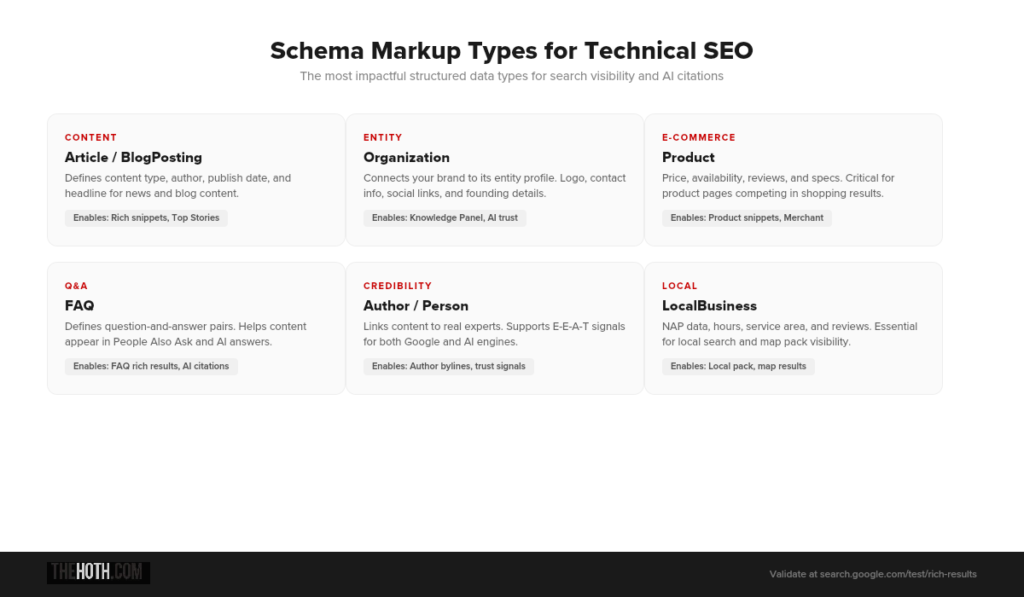
The most impactful schema types: Article and BlogPosting (for content). LocalBusiness and Organization (for companies). Product (for e-commerce). FAQ (for question-based content). HowTo (for instructional content). Review and AggregateRating (for social proof).
Use Google’s Rich Results Test to validate your markup and preview how it renders in search results.
19. Add Organization and Author Schema
This is where E-E-A-T meets technical SEO.
Organization schema connects your site to your brand entity. Author schema connects your content to real people with real expertise. Both of these help Google verify credibility and build trust signals.
In the age of AI-generated content, proving that your content was written by a real expert is increasingly valuable. Schema markup is one of the most direct ways to do that.
20. Keep Your Schema Updated
Outdated schema is worse than no schema.
If your FAQ page has changed but the schema still reflects old questions, Google may flag it as misleading. If your product is out of stock but the schema shows “InStock,” you’ve got a trust problem.
Audit your structured data quarterly. Or better yet, set up automated schema generation that pulls from your actual page content.
Part 6: Mobile Optimization
Google uses mobile-first indexing for the majority of the web. That means the mobile version of your site is the one Google primarily evaluates. Not desktop.
21. Ensure Full Mobile Parity
Every piece of content that exists on your desktop site should also be accessible on mobile. That includes text, images, videos, internal links, structured data, and meta tags.
If your mobile version strips out content that’s present on desktop, Google won’t see that content when indexing your site.
22. Test Your Mobile Usability
Google Search Console has a Mobile Usability report that flags issues like text that’s too small, clickable elements that are too close together, and content that’s wider than the screen.
Other things to check: Are your fonts readable without zooming? Does your navigation work on touch devices? Do forms function properly on mobile? Are pop-ups compliant with Google’s intrusive interstitial guidelines?
Mobile accounts for 63% of organic search traffic. If your mobile experience is bad, you’re losing the majority of your potential audience.
23. Optimize for Mobile Page Speed
Mobile connections are often slower and less stable than desktop. That makes performance optimization even more critical.
Test your pages on mobile specifically (not just desktop) using PageSpeed Insights. Focus on reducing JavaScript execution, compressing images for smaller screens, and minimizing the number of HTTP requests.
Part 7: AI Readiness (New for 2026)
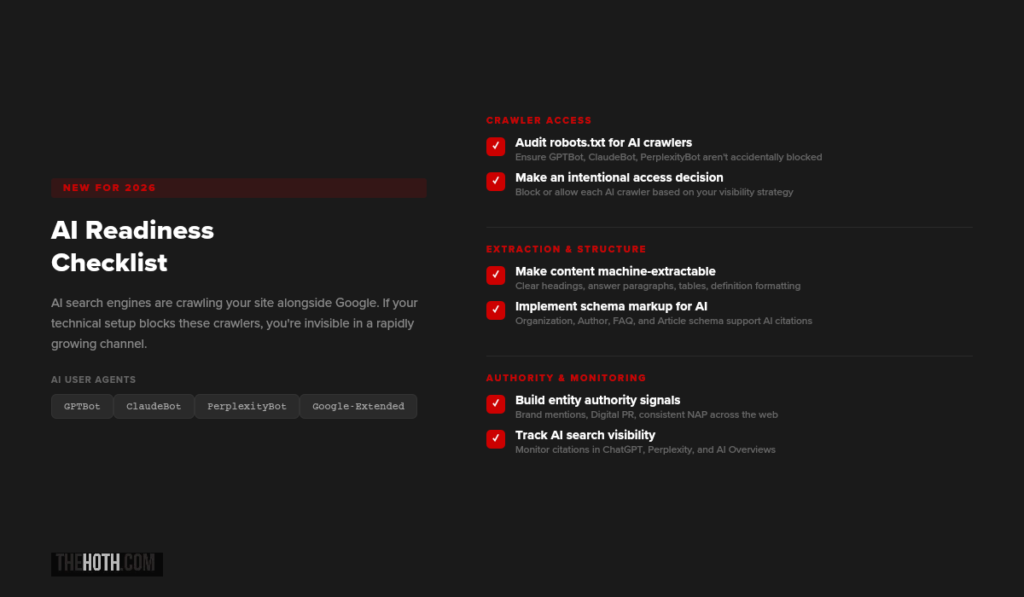
Here’s what’s changed. AI search engines are now crawling your site alongside Google. Tools like ChatGPT (via GPTBot), Perplexity, Google’s AI Overviews, and others are pulling content from your pages to generate answers.
If your technical setup blocks these crawlers or makes your content hard to extract, you’re missing out on a rapidly growing traffic source.
24. Check Your Robots.txt for AI Crawlers
Just like you can block Googlebot, you can block AI crawlers. And some sites do this accidentally.
The main AI user agents to know: GPTBot (OpenAI/ChatGPT). ClaudeBot (Anthropic). PerplexityBot. Google Extended (used for AI training, separate from regular Googlebot).
If your robots.txt blocks any of these, AI engines won’t be able to access your content. Whether you want to block them is a strategic decision, but you should at least know what’s currently happening.
Check yoursite.com/robots.txt and search for these user agent names.
25. Make Your Content Machine-Extractable
AI engines don’t “read” your site the way humans do. They pull specific chunks of content and synthesize them into answers. The easier you make it for them to identify and extract those chunks, the more likely you are to get cited.
What helps: Clear heading hierarchy (H1, H2, H3 in logical order). Concise answer paragraphs near the top of each section. Definition-style formatting for key concepts. Tables and lists for comparative or structured information. Schema markup that gives explicit meaning to your content.
This isn’t a separate strategy from good SEO. It is good SEO. The same formatting that helps AI engines extract your content also helps Google understand it better.
26. Build Entity Authority Signals
AI search engines don’t just look at individual pages. They evaluate your brand’s overall authority on a topic.
That means your entity profile matters. Are you mentioned across authoritative third-party sources? Do you have consistent NAP (name, address, phone) data across the web? Is your organization schema properly implemented?
Brand mentions in AI search are driven by off-site authority signals just as much as on-site content. Digital PR and link outreach play a direct role here.
27. Monitor Your AI Search Visibility
You can’t improve what you don’t measure.
Traditional SEO has well-established tracking tools. AI search visibility is newer territory. But you can still track your brand’s presence across platforms like ChatGPT, Perplexity, and Google AI Overviews.
Our AI Discover program includes AI visibility tracking as part of the service. If you want to see where your brand shows up (and where it doesn’t) across AI platforms, that’s a good starting point.
Part 8: Additional Technical Checks
These items don’t fit neatly into the categories above, but they’re still important.
28. Implement Hreflang Tags (If Applicable)
If your site targets multiple languages or regions, hreflang tags tell Google which version to serve to which audience. Without them, you risk showing English content to Spanish-speaking users (or vice versa), or having different regional versions compete against each other.
29. Optimize URL Structure
Clean URLs are easier for both search engines and users to understand.
Good: /blog/technical-seo-checklist/
Bad: /blog/?p=12847&category=seo&tag=technical
Keep URLs short, descriptive, and lowercase. Use hyphens to separate words. Avoid URL parameters wherever possible.
30. Set Up a Custom 404 Page
When users land on a page that doesn’t exist, a custom 404 page helps them navigate back to useful content instead of bouncing.
Include links to your homepage, popular content, and a search bar. This is simple but it reduces bounce rates from broken or outdated links.
31. Audit Your Internal Linking
Internal links distribute authority across your site and help search engines discover content. If key pages have few or no internal links pointing to them, they won’t perform as well as they could.
Use a tool like Screaming Frog to map your internal link structure and identify pages that need more links.
32. Check for JavaScript Rendering Issues
If your site relies heavily on JavaScript to render content (single-page apps, React, Angular, etc.), make sure Google can actually see the rendered content.
Use the URL Inspection Tool in Search Console and click “View Tested Page” to see what Google’s renderer actually sees. If critical content is missing from the rendered version, you’ve got a JavaScript rendering issue that needs fixing.
The Technical SEO + AI Readiness Connection
Let’s connect the dots on something important.
Every technical SEO improvement you make for Google also benefits your AI search visibility.
Fixing crawlability? AI bots can access your content. Implementing structured data? AI engines understand your content better. Improving site speed? AI crawlers process your pages more efficiently. Building entity authority? AI engines cite your brand more often.
This isn’t two separate strategies. It’s one strategy that compounds across both ecosystems.
Our e-commerce client is a perfect example. After a technical SEO audit fixed their crawlability and indexing issues, they didn’t just recover their Google traffic. They gained 54 AI citations across ChatGPT, Perplexity, and Google’s AI Overviews. The technical foundation enabled visibility in both places.
If you’re looking for help running a comprehensive audit, our Technical SEO service covers all of this. And if you want ongoing managed SEO that includes technical health monitoring, HOTH X is built for exactly that.
Quick-Start Priority List
Not sure where to begin? Start here.
1. Run a crawl. Use Screaming Frog or Ahrefs to identify broken links, redirect chains, orphan pages, and crawl errors.
2. Check Google Search Console. Review the Pages report for indexing issues. Check Core Web Vitals for performance problems. Look at the Security section for any flags.
3. Test your Core Web Vitals. Use PageSpeed Insights on your top 10 pages. Focus on the worst performers first.
4. Audit your robots.txt. Make sure you’re not blocking important pages from Google or AI crawlers.
5. Validate your structured data. Run your key pages through Google’s Rich Results Test.
6. Check your mobile experience. Load your site on a phone. Is it fast? Is it usable? Would you stay?
FAQ
How often should I run a technical SEO audit?
At minimum, once per quarter for established sites. New sites should audit every few weeks until the foundation is solid. Major site changes (redesigns, platform migrations, large content additions) should always trigger an immediate audit.
What’s the most common technical SEO mistake?
Accidentally blocking pages from being indexed. Whether it’s a leftover noindex tag from staging, a robots.txt directive that’s too broad, or broken canonical tags, this single mistake can tank your visibility overnight.
Do I need technical SEO if I have good content?
Yes. Content quality and technical SEO serve different purposes. Your content gets people to engage. Technical SEO gets search engines to find and serve that content. One without the other is incomplete.
How does technical SEO affect AI search?
AI search engines use many of the same signals Google does. They crawl your site, evaluate structured data, and assess authority. If your technical SEO blocks crawlers or makes content hard to extract, you’ll be invisible in AI search results too.
Can I do a technical SEO audit myself?
You can handle the basics with free tools like Google Search Console, PageSpeed Insights, and the Rich Results Test. For a comprehensive audit that covers everything in this checklist (and catches issues you might miss), a professional audit is worth the investment.
What’s the difference between technical SEO and on-page SEO?
On-page SEO focuses on optimizing individual page content: keywords, headings, meta tags, internal links, and readability. Technical SEO focuses on site-wide infrastructure: crawlability, indexing, speed, security, and structured data. Both matter. They’re different layers of the same foundation.
Is site speed really a ranking factor?
Yes. Google has confirmed that Core Web Vitals are a ranking signal. Sites that pass all three metrics (LCP, INP, CLS) have a measurable advantage, especially when competing against pages with similar content quality and authority.
What about AI crawlers? Should I block them?
That’s a strategic decision. If you block AI crawlers, your content won’t appear in AI-generated answers. For most businesses, the visibility upside of allowing AI crawlers outweighs the concerns. But review your robots.txt and make an intentional choice rather than leaving it to chance.
The Bottom Line
Technical SEO isn’t glamorous. Nobody writes case studies about their beautiful robots.txt file.
But it’s the foundation that everything else depends on. Your content, your links, your authority signals, even your AI visibility. All of it is built on technical infrastructure.
The good news is that most of this checklist is fixable. And the sites that do fix it gain an immediate advantage over the majority that don’t.
If you want help, we’ve got two paths depending on what you need.
For a one-time deep dive, our Technical SEO Audit covers crawlability, indexing, performance, structured data, and AI readiness in a comprehensive report with prioritized recommendations.
For ongoing SEO management that keeps your technical health in check month over month, HOTH X is the move. Your dedicated strategist monitors technical health alongside content, links, and AI visibility.
Either way, don’t let the invisible stuff hold back the visible stuff. Run the audit. Fix the issues. Build on a foundation that actually supports growth.Book a free consultation and we’ll walk through your site’s technical health together.
Leave a comment