
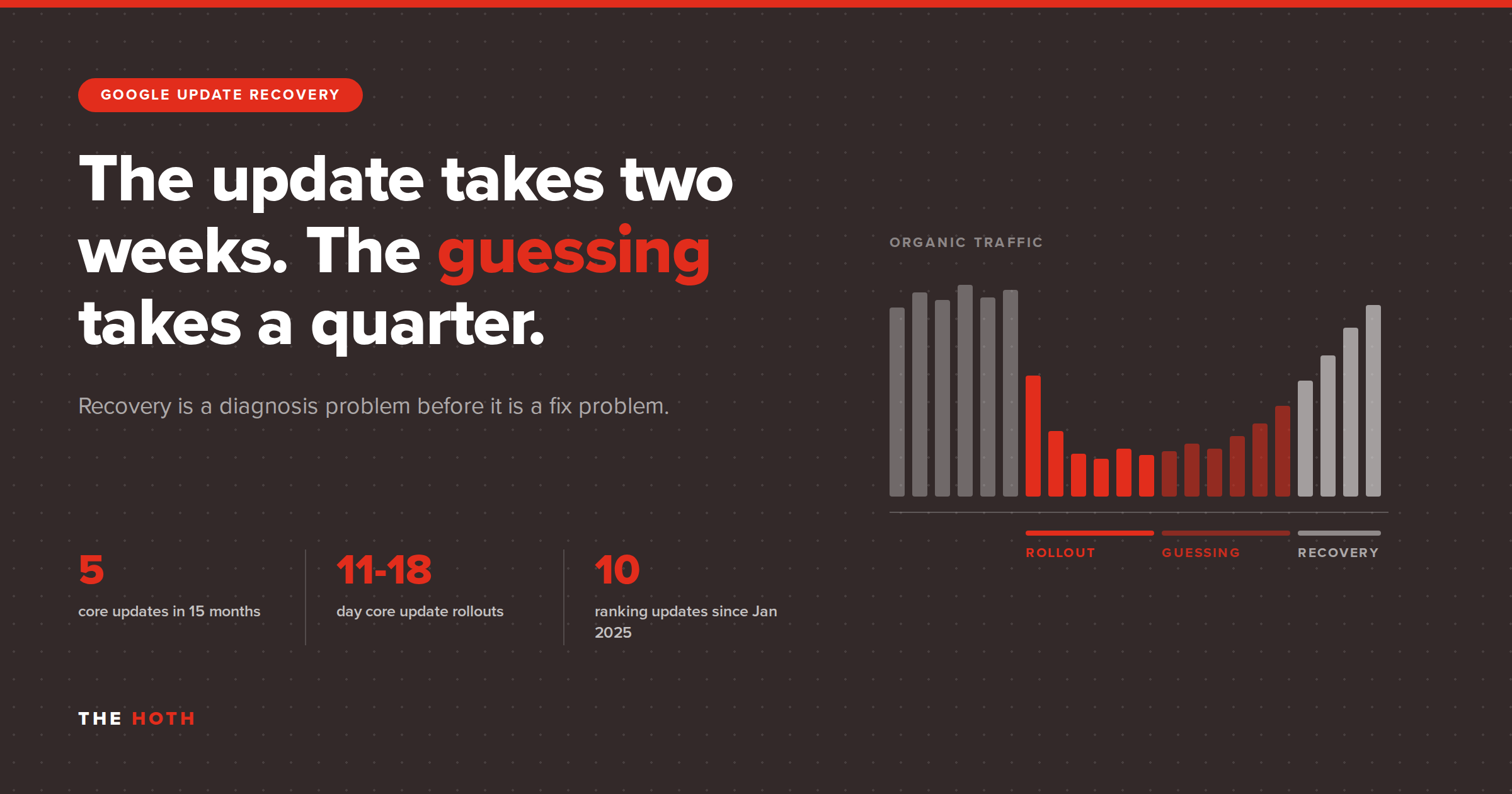

A Google update costs you the traffic you lose during the rollout plus the weeks you spend guessing at the cause, and the second cost is almost always the bigger one. Recovery starts with a diagnosis, not a rewrite: confirm the drop is real, date it, match it against the update calendar, and only then decide what to change. Sites that follow that order recover. Sites that skip to the rewrite usually stay flat.
You open Search Console on a Monday and the line has fallen off a shelf. Clicks are down 40%. Somebody in Slack says “core update,” somebody else says “we need to rewrite the blog,” and by Wednesday three people are editing pages that were fine on Friday.
That is how most update recoveries go wrong. Not because the fixes were bad, but because nobody confirmed what broke.
Google runs several ranking updates a year, and each one puts your rankings in play for two weeks or more. Meanwhile, plenty of what looks like an update is not one: it is a redesign, a botched migration, a reporting glitch, or a rich result Google quietly stopped showing. Each of those has a different fix, and applying the wrong one costs you another month.
This post covers what an update costs in real terms, how to tell an update apart from the other things that flatten traffic, what recovery has looked like across our campaigns, and exactly what to do in the first 30 days. If the drop turns out to be technical rather than editorial, a Technical SEO Audit is where the diagnosis happens.
What does a Google update really cost you?
The direct cost is the traffic you lose during and after the rollout. The larger cost is the gap between the drop and a correct diagnosis, because core update rollouts commonly run two weeks or longer, and anything you change during that window cannot be measured cleanly.
Google publishes every confirmed ranking update, with start dates and rollout durations, on its Search Status Dashboard. It is the only authoritative source for update dates, and the durations are the part most people scroll past.
Here are the last five broad core updates and how long each took to finish rolling out:
- March 2025 core update: 13 days, 21 hours
- June 2025 core update: 16 days, 18 hours
- December 2025 core update: 18 days, 2 hours
- March 2026 core update: 12 days, 4 hours
- May 2026 core update: 11 days, 21 hours
Five core updates in fifteen months, each running close to two weeks. Add the spam updates and the February 2026 Discover update, which ran 21 days and 17 hours on its own, and Google logged ten confirmed ranking updates between January 2025 and August 2026. Our breakdown of the March 2026 core update walks through what that particular cluster of activity did to rankings.
Now put money on it. Say organic drives 1,000 leads a month for you. You lose 30% of that for a quarter while the team figures out what happened. That is 900 leads. At a 3% close rate and a $2,000 average deal, you are out roughly $54,000.
The rollout itself accounts for maybe two weeks of that. The other ten weeks are diagnosis, debate, and hesitation. That is the part you control.
There is a second cost that does not show up in a traffic chart: the work you undo. Teams that panic and rewrite during a rollout lose their baseline. When the rankings settle, they cannot tell whether the recovery came from the rewrite, the rollout finishing, or something else entirely. So they cannot repeat it next time.
How do you tell a Google update from everything else that drops your traffic?
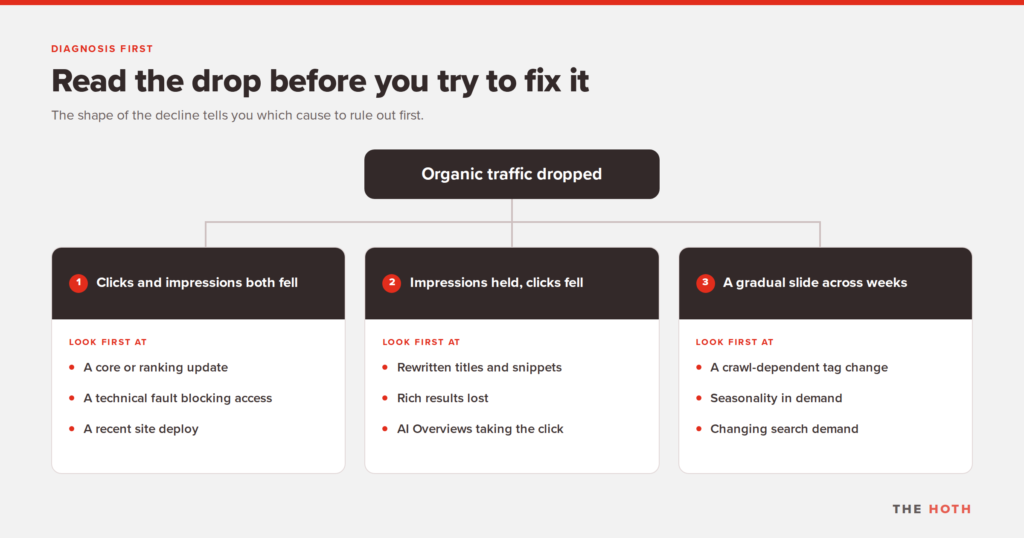
Compare the shape and date of the drop against the update calendar before you assume an update caused it. Google’s own guidance lists six main causes of lost Search traffic, and only one of them is algorithmic. A sudden site-wide cliff points at an update, a security problem, or a deploy; a slow slide usually points at seasonality, a crawl-dependent tag, or changing demand.
Google’s documentation on debugging drops in Search traffic is the reference here, and it is more useful than most of what gets written about it. It groups causes into algorithmic updates, technical issues, security issues, spam issues, seasonality and changing interests, and site moves and migrations.
Three questions separate them fast.
Did clicks and impressions fall together?
If both fell, you lost visibility, and the full cause list applies. If impressions held steady and only clicks fell, you are still ranking. Something is taking the click instead: a weak title or snippet, a competitor’s rich result, or an AI Overview answering the question above you. That is a completely different problem with a completely different fix.
Did it happen in one day or over three weeks?
Site-wide cliffs are updates, outages, manual actions, or a deploy. Gradual slides are usually crawl-dependent: a stray noindex tag or a robots.txt change only spreads through your site as fast as Google recrawls it, so the damage arrives in slow motion.
Does the date line up with a confirmed update?
Pull the exact day the line broke, then check the status dashboard. If your drop started four days before the rollout began, the rollout is not your culprit. Check your own deploy log for that same week instead.
One more check almost everyone skips: confirm the drop is even real. Google keeps a running list of data anomalies in Search Console, and it is rarely empty. A logging error suppressed reported impressions from May 13, 2025 all the way until April 27, 2026. FAQ rich results stopped appearing in Google Search on May 7, 2026, which dropped reported FAQ impressions for every site that had them. Neither event was a ranking change. Both look exactly like one in a chart.
And before any of that: check that your analytics tag is still firing. A GA4 tag removed in a deploy looks identical to a traffic collapse, and it is not one.
Why do most update recoveries fail?
Most recoveries fail because the work starts before the rollout finishes and before anyone knows which pages were hit. Google recommends waiting at least a full week after a core update completes before analyzing, and warns against changing content that is already performing well. Rewriting in week one destroys the baseline you need to measure against.
Google’s core updates guidance is unusually blunt about this, and it contradicts a lot of the advice that circulates after every rollout.
It says to confirm the update has finished rolling out first. Then wait a full week. Then compare that week against a week from before the rollout started. Until then, the numbers are still moving and you are reading noise.
It draws a hard line between a small drop in position, like moving from position 2 to 4, and a large one, like dropping from 4 to 29. For a small drop, Google’s recommendation is to do nothing. Positions are not fixed, pages that slipped two spots often come back on their own, and editing a page that is still ranking well is a reliable way to turn a small drop into a large one.
It warns against quick fixes, meaning removing a page element because you read somewhere that element was bad for SEO. And it calls deleting content a last resort. Google’s framing is pointed: if you are considering deleting whole sections of your site, that is a sign those sections were built for search engines rather than for people in the first place.
On timing, Google says some changes take effect in a few days while others can take several months for its systems to confirm that the site as a whole is producing helpful content in the long term. If a few months pass and nothing moves, you may be waiting for the next core update.
That last point is the one that costs businesses money, because it means a recovery plan measured in weeks was the wrong plan before anyone started.
What does recovery from a Google update look like in practice?
Recovery looks like a diagnosis, a fix list ordered by severity, and then several months of consistent work. Across our campaigns, sites that lost nearly all of their organic traffic have come back and passed their previous peak, but the timeline has run three to six months, not three to six weeks.
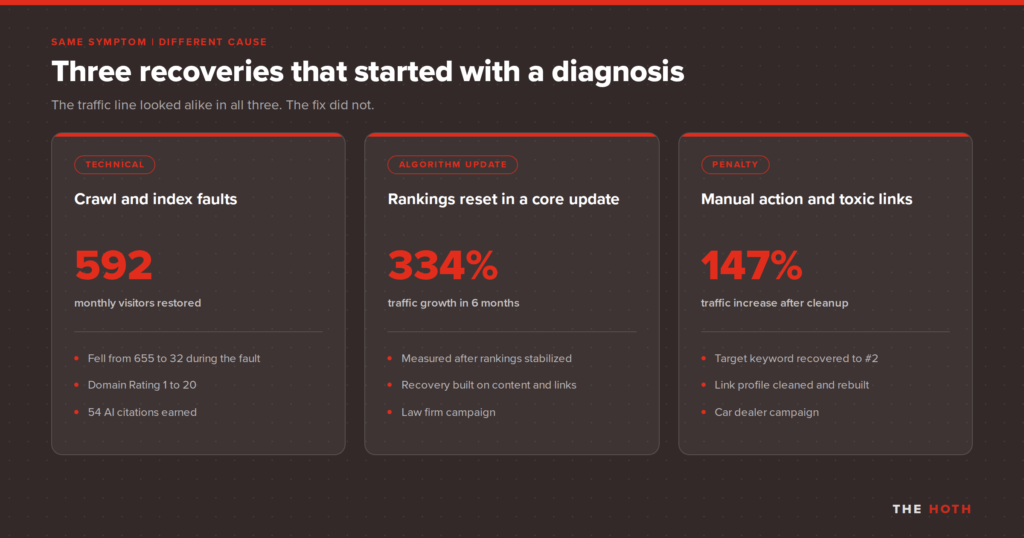
Three campaigns from our case study library show the range, and the useful part is that all three started with the same symptom and ended with three different fixes.
When the cause was technical
An Australian fine jewelry site had grown from 65 monthly organic visitors to 655 over six months with us. Then the client shipped sitewide design changes, and traffic collapsed to 32 visitors a month.
The redesign had introduced index bloat, with more than 4,000 pages crawled but not indexed. Category pages used a “load more” button, which Googlebot cannot click, so most of the store’s inventory was hidden. A misconfigured robots.txt was creating redirect chains across more than 85 URLs. Seventy-two pages had duplicate headers and thirty-five had duplicate titles.
A technical audit found all of it. Canonical tags, standard pagination, and a clean sitemap fixed it. Traffic came back to 592 visitors a month, domain rating climbed from 1 to 20, and the site picked up 54 AI citations across ChatGPT, Perplexity, and Google’s AI Overviews after having none at all.
Notice what was not the problem there. No Google update touched that site. The client’s own redesign did.
When the cause was an update
A law firm in Toronto came to us with traffic falling after a Google algorithm update. We stabilized the decline first, then rebuilt with consistent content and link building over six months, and traffic grew 334%. The case study is worth watching for the shape of the curve more than the headline number: the line goes flat before it goes up, and that flat stretch is where most teams give up and start over.
When the cause was a penalty
A car dealer came to us with rankings suppressed by a penalty. Recovery work moved their exact-match target keyword to a strong number two and lifted traffic 147%. The full case study covers the sequence.
Same symptom in all three. Three causes, three fixes, three timelines. That is the entire argument for diagnosing before you act.
The pattern holds at smaller scale too. A glass company gained 43% more traffic in three months off a technical audit, and an online apparel store saw a 121% traffic increase and a 3-point domain rating gain in the same window. Neither needed a content overhaul.
What should you do in the first 30 days after a drop?
Spend the first week confirming the drop is real and dating it precisely, the second week identifying which pages and queries lost the most, and the rest of the month fixing whatever the evidence names. Do not make sitewide content changes until the rollout has completed and a full week has passed.
Days 1 to 3: confirm the drop exists
Open the Search Console Performance report and set the date range to the last 16 months. Google recommends that specific range so you can rule out annual seasonality, and plenty of “drops” turn out to be the exact same dip that happened last year. Then check the data anomalies page. Then confirm your analytics tag is still firing.
Days 4 to 7: date it and match it
Find the precise day the line broke. Check the status dashboard for a confirmed update covering that date. Check your deploy log and your CMS history for the same week. Whichever one lines up is your first suspect, and if two line up, treat the technical one as primary because it is faster to rule out.
Days 8 to 14: find the pattern
Use the Performance report’s compare mode against the previous period, then sort the Pages table by clicks difference. You are answering one question: did this hit the whole site, one template, one topic cluster, or one page that happened to carry a third of your traffic? A site-wide pattern sends you to the Page indexing report. A group of pages sends you to the URL Inspection tool. A topic cluster points at content quality rather than infrastructure.
Days 15 to 30: fix what the evidence names
Technical faults get fixed immediately, because there is no waiting period on a broken canonical tag. Content quality problems get worked deliberately, page by page, starting with the pages that lost the most traffic and still carry commercial value. A content refresh on your twenty most valuable pages will beat a rushed rewrite of two hundred every time.
If the Manual Actions report in Search Console shows anything, stop and handle that first. Manual actions come from human reviewers enforcing the Google Search spam policies, they are a separate track from algorithmic drops, and no amount of content work will clear one.
When is the drop technical rather than editorial?
It is technical when the pages that lost traffic share a template, a URL pattern, or a deploy date but have nothing in common editorially. It is editorial when the losses cluster by topic and the pages that replaced you are visibly more useful. A technical audit settles the question, and guessing at it is where recovery budgets get burned.
The jewelry site above is the clean example. Nothing was wrong with that content. The content was invisible.
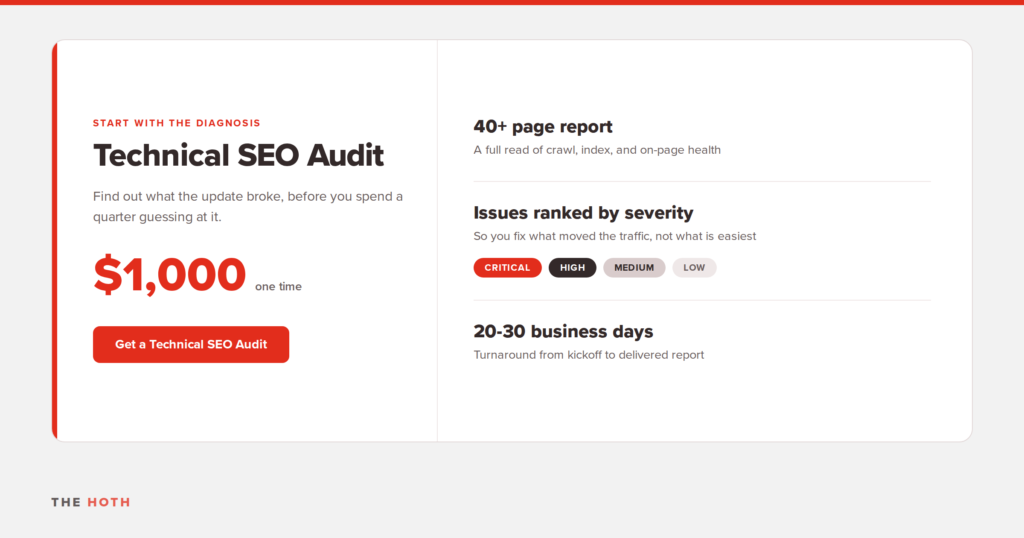
Our Technical SEO Audit is built for exactly this moment. It runs $1,000, covers a deep crawl across your entire domain, and comes back as a report, often more than 40 pages, with every issue sorted into Critical, High, Medium, and Low so you know what to fix first and what can wait. Turnaround is typically 20 to 30 business days depending on how big and complicated your site is. We ask for Google Search Console access, because that is how we see what Google sees.
What it covers:
- Access and indexing: robots.txt, sitemaps, and canonical tags, so nothing sits between your content and the crawlers
- URL and site structure: redirect chains, 404s, and orphan pages that waste crawl budget on dead ends
- On-page and schema: header structure and structured data checked against current standards
- Technical performance: Core Web Vitals and mobile responsiveness across your key pages
After the audit you have two paths. Hand the report to your developers and run with it, or have us quote the implementation and pick which priority tiers you want us to take on. Either way, you get the diagnosis before anyone spends a dollar on a fix.
If the drop turns out to be editorial rather than technical, that is a different program, usually Managed SEO or a content refresh. The audit tells you that too, which is the point of running it first.
How do you make the next Google update cost you less?
You cannot update-proof a website, but you can shorten the diagnosis, and that is where the money is. Sites that recover fastest have a dated change log, a clean technical baseline, and traffic that does not all come from one page.
Four things reduce your exposure before anything happens.
Keep a change log with dates
Every deploy, redesign, migration, plugin update, and content batch, with the date attached. Half of update diagnosis is answering “what else changed that week,” and most teams cannot answer it. Ten minutes of logging saves two weeks of archaeology.
Fix technical debt before it matters
The issues that sank the jewelry site existed before the traffic fell; the redesign just made them load-bearing. Running through a technical SEO checklist once a year catches most of them while they are still cheap to fix.
Do not let one page carry the site
If a single page accounts for 40% of your organic traffic, an update that touches that one query takes 40% of your traffic with it. Concentration is the risk, not the ranking.
Build visibility Google does not control
Getting cited in AI answers and earning coverage on third-party sites puts you in front of people through channels that do not route through the same ranking systems. AI Discover is how we handle that side. It will not make you immune to a core update, but it means the update takes a slice instead of the whole pie.
Frequently asked questions about Google update recovery
Recovery timelines run in months rather than weeks, deleting content is a last resort, and the first job is always separating an algorithmic drop from a technical one. The answers below cover the questions clients ask most in the first week after a drop.
How long does it take to recover from a Google core update?
Plan for months, not weeks. Google says some changes take effect within a few days while others take several months for its systems to confirm the site is producing helpful content over the long term. If several months pass with no movement, you may be waiting for the next core update.
Can you recover from a core update without waiting for the next one?
Yes. Google says it makes continual updates to its ranking systems, including smaller core updates that are not announced because they are not widely noticeable. Improvements can be reflected through those rather than only at the next major rollout.
Should I delete the pages that lost traffic?
Only as a last resort. Google’s guidance treats deletion as a final option, and notes that wanting to delete entire sections of a site is usually a sign those sections were built for search engines rather than readers. If that is true of your site, removing the unhelpful pages can help the good ones perform better, but that is a strategic decision, not a recovery tactic.
How do I know if I have a manual action instead of an algorithmic drop?
Check the Manual Actions report in Search Console. Manual actions are issued by human reviewers for spam policy violations and always appear in that report. Algorithmic drops generate no notice at all, which is why the absence of a message tells you something useful.
My impressions are steady but my clicks fell. Is that a Google update?
Probably not a ranking change. When impressions hold and clicks drop, you are still appearing in results but losing the click. That points at your title and snippet, a competitor picking up a rich result, or an AI Overview answering the query before anyone reaches your listing.
Does a technical audit help with AI search visibility too?
Yes. Crawlability, clean structured data, and sane site architecture are what allow AI systems to extract and cite your content. The jewelry site in this post earned 54 AI citations after its technical cleanup and had zero before it, without any change to the underlying content.
How often does Google release updates that could affect my rankings?
Google confirmed ten ranking updates between January 2025 and August 2026, including five broad core updates. Most sites never notice most of them. The dashboard is the place to check whether the one you are worried about is real.
The bottom line on Google update recovery
An update costs you traffic. Guessing costs you more. The sequence that works is the same every time: confirm the drop is real, date it, match it against the update calendar and your own deploy log, find the pattern in the pages that lost, then fix the thing the evidence names.
Skip a step and you spend a quarter improving content that was never the problem, while the broken canonical tag from last month’s deploy sits there quietly costing you leads.
If your traffic dropped and you cannot tell whether it is the algorithm or your own site, book a call and we will tell you which one you are dealing with before you spend anything trying to fix it.
Leave a comment